TL;DR
- Strapi's official
users-permissionsplugin works fine, but if you want modern auth flows (social providers, two-factor, magic links) the community Better Auth plugins are a solid alternative — though they're still in alpha/beta. - The migration is more than a plugin swap:
plugin-better-authrefuses to load alongsideusers-permissions, so you also lose the role/permission system U&P provides. You get it back by addingplugin-api-permissions. - The full beta setup is actually three plugins:
plugin-better-auth(auth flows),plugin-api-permissions(Content API RBAC),plugin-better-auth-dashboard(admin UI for users and sessions). - Three paths to apply this: clone the finished example, run a Claude Code skill on your own project, or walk through the steps by hand. The post covers all three.
Why This Post Exists
Strapi LaunchPad is the marketing-site starter we use to show off what Strapi v5 + Next.js can do. Out of the box it uses the official @strapi/plugin-users-permissions plugin for auth, which is the safe, supported choice.
But Strapi's community has been building a more modern alternative: a set of plugins that wraps the excellent Better Auth library and gives you sign-up flows, sessions, social providers, two-factor, magic links, and a real admin dashboard for managing users — all without writing controller code.
In this tutorial I'm going to walk you through, end to end, replacing users-permissions with the Better Auth stack on top of LaunchPad. You'll come out the other side with:
- A clean Strapi backend running
plugin-better-auth+plugin-api-permissions+plugin-better-auth-dashboard - The existing LaunchPad Next.js frontend hitting the new auth endpoints
- A working sign-up flow tested in the browser
- An admin dashboard at Strapi Admin → Better Auth for managing users and sessions
Heads-up before you start: all three community plugins are pre-release at the time of writing —
plugin-better-auth@1.0.0-beta.6,plugin-api-permissions@1.0.0-alpha.3, andplugin-better-auth-dashboard@1.0.0-alpha.7. Do not run this in production yet. This is a playground / starter-template exercise.
Three ways to apply this
Pick the path that matches what you actually want:
1. Just clone the finished example — fastest, no learning.
git clone https://github.com/PaulBratslavsky/launchpad-better-auth-example.git
cd launchpad-better-auth-example
yarn install
yarn setup
yarn seed
yarn dev
That gives you a working Better Auth stack at http://localhost:3000 (Next.js) with Strapi running on http://localhost:1337. Skip the rest of this post.

2. Apply automatically to your own project — when you already have a Strapi v5 + Next.js App Router project and don't want to do this by hand.
There's a Claude Code skill at .claude/skills/better-auth-setup/ in the example repo that automates every change in this post. Clone the example repo into a directory next to your own project (or copy the .claude/skills/better-auth-setup/ folder into your own project), open Claude Code, and ask "set up better auth on this strapi and next.js project". The skill discovers your Strapi and Next.js folders and applies the same templates this post walks through.
3. Walk through it by hand — recommended if you're seeing these plugins for the first time, your project differs from LaunchPad in any meaningful way, or you want to understand each gotcha so you can debug later. That's the rest of the post.
The three paths share the same end state, the same templates, and the same gotcha fixes. Reading the manual walkthrough below makes the skill's output easier to audit, and the cloned example a useful diff target.
Architecture: How the Three Plugins Fit Together
users-permissions is one plugin that does three jobs at once: it authenticates users, it provides a User content type, and it authorizes API requests via roles and permissions. The Better Auth stack splits those concerns:
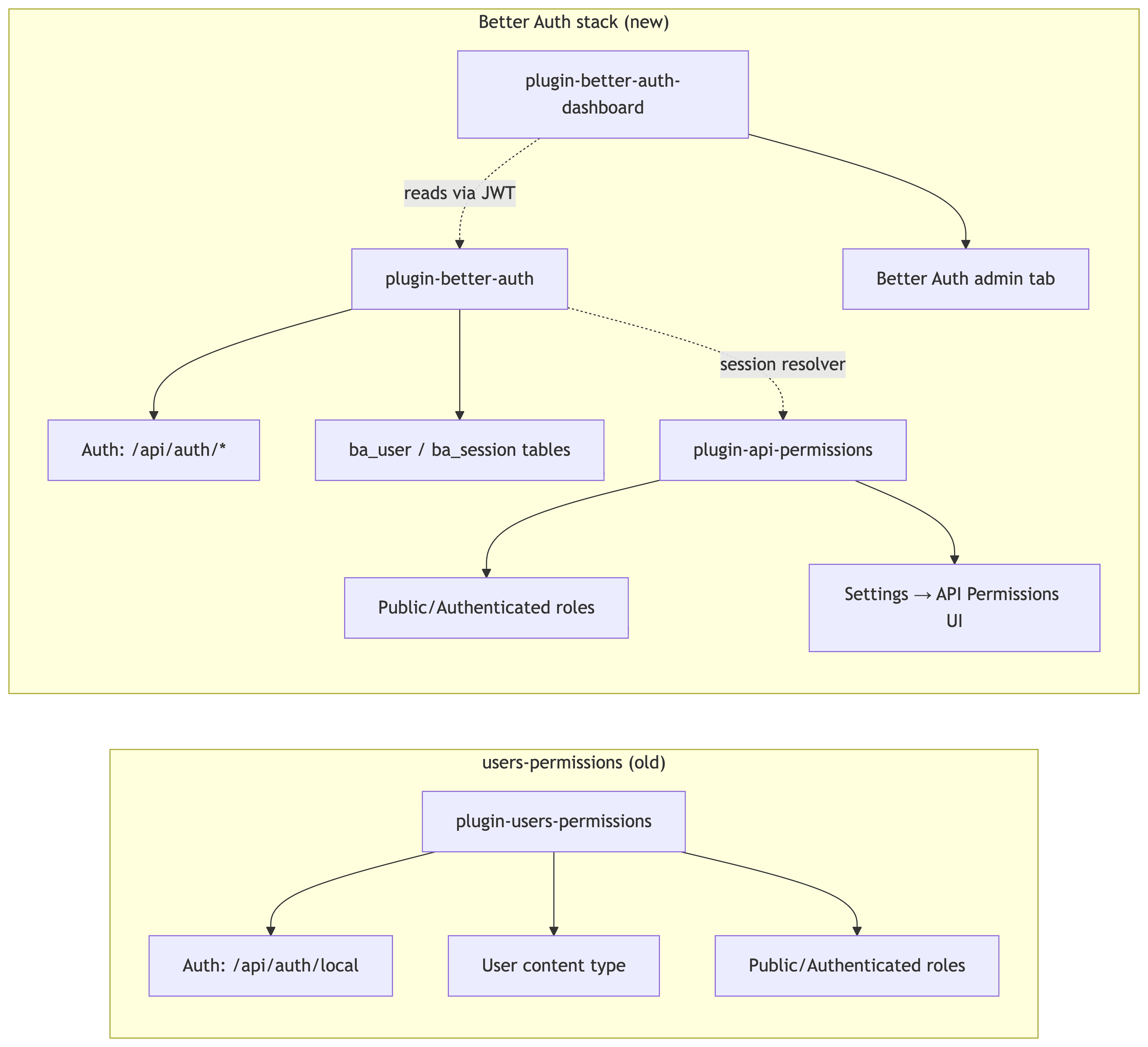
The trade-off: more plugins to install, but each has one job. You can swap plugin-better-auth out for any other auth provider later (Clerk, Auth0, Supabase) without rewriting your permission model, because plugin-api-permissions is auth-agnostic.
Prerequisites
Before you start, make sure you have:
- Node.js 20+
- Yarn (LaunchPad uses Yarn 4)
- A code editor
- A clean working directory
Step 1 — Clone LaunchPad and Get the Default Setup Running
Start from the official main branch so we share a baseline:
git clone https://github.com/strapi/LaunchPad.git
cd LaunchPad
LaunchPad is a monorepo-ish structure with two top-level folders:
LaunchPad/
├── strapi/        # Strapi v5 backend
├── next/          # Next.js 16 frontend
└── ...
Install, seed, and run the project from the repo root to confirm everything works on your machine:
yarn install
yarn setup
yarn seed
yarn dev
What each script does:
yarn install— installs the root workspace deps.yarn setup— runsyarn installinsidestrapi/andnext/and copies each app's.env.exampleto.env.yarn seed— imports the bundled Strapi data so Next.js has content to render. Without this, the home page throwsFailed to fetch single type "global"because it queries theglobalsingle type at boot against an empty DB.yarn dev— boots Strapi onhttp://localhost:1337and Next.js onhttp://localhost:3000concurrently.
Open http://localhost:3000 — you should see the LaunchPad marketing site. Open http://localhost:1337/admin and confirm Strapi boots (you can skip creating the admin user — we'll wipe the database in Step 11). Then stop both servers and create a branch to do the migration on:
git checkout -b better-auth-migrationStep 2 — Confirm Strapi is 5.45.0+
plugin-better-auth enforces a minimum Strapi version of 5.45.0 in its register lifecycle. Open strapi/package.json and check that @strapi/strapi and @strapi/plugin-cloud are at 5.45.0 or higher.
At time of writing LaunchPad's main ships with 5.46.0, so most likely you don't need to change anything. If you cloned an older snapshot, bump them to a matching 5.45+ version:
{
  "dependencies": {
    "@strapi/plugin-cloud": "5.46.0",
    "@strapi/strapi": "5.46.0"
  }
}
Step 3 — Remove @strapi/plugin-users-permissions
plugin-better-auth replaces users-permissions — it doesn't run alongside it. The plugin checks for the users-permissions package at boot and throws if it finds it, so disabling it in config/plugins.ts isn't enough; you have to remove it from package.json.
Uninstall it from the strapi/ workspace:
cd strapi && yarn remove @strapi/plugin-users-permissionsThat drops the package from strapi/package.json, removes it from node_modules/, and updates the lockfile in one step.
This means you also lose the Public and Authenticated roles that users-permissions used to provide. Don't worry — we'll restore them via plugin-api-permissions in a moment, and your code won't notice because LaunchPad's existing code already routes auth through Better Auth (the previous branch state). If you're starting from a project that uses U&P for actual login or roles, plan a migration story for your existing users.
Step 4 — Install the Three Community Plugins
From strapi/:
yarn add \
  better-auth \
  @strapi-community/plugin-better-auth \
  @strapi-community/plugin-api-permissions \
  @strapi-community/plugin-better-auth-dashboard \
  @better-auth/infra \
  zod@^4.1.12
If you're on npm, the equivalent is npm install --legacy-peer-deps better-auth @strapi-community/plugin-better-auth ... — same packages, same result. pnpm works identically.
| Package | Role | Links |
|---|---|---|
better-auth | The core auth library | docs · npm · github |
@strapi-community/plugin-better-auth | Strapi database adapter and route mounter | docs · readme · npm |
@strapi-community/plugin-api-permissions | Public + Authenticated roles, Content API RBAC | readme · npm |
@strapi-community/plugin-better-auth-dashboard | Admin panel UI for users / sessions | readme · npm |
@better-auth/infra | Peer dep of the dashboard's dash() plugin | npm |
zod@^4.1.12 | Workaround: see callout below. | docs · npm · github |
Why pin
zod@^4.1.12? The dashboard plugin callsz.email(), which only exists in zod 4. Strapi pulls in zod 3 transitively, so without an explicit top-level pin the dashboard crashes. You can skip the pin only if you also skip@better-auth/infra/dash()insrc/lib/auth.ts.
Step 5 — Enable the Plugins in config/plugins.ts
Replace the existing better-auth block with the three-plugin config:
// strapi/config/plugins.ts
export default () => ({
  'better-auth': {
    enabled: true,
  },
  'better-auth-dashboard': {
    enabled: true,
  },
  'api-permissions': {
    enabled: true,
  },
});
Step 6 — Create src/lib/auth.ts
This step comes from the plugin's Installation guide, which tells you to put your betterAuth() call in src/lib/auth.ts. We add it because every Better Auth integration needs a single config file that does three things:
- declares which providers and plugins are enabled (email/password, JWT, the dashboard)
- exports the configured
authinstance the Strapi runtime imports at boot to mount the/api/auth/*routes - gives the Better Auth CLI a
--configtarget so it can generate the matching content types in Step 9
Create a new file at strapi/src/lib/auth.ts (make the lib/ folder if it doesn't exist) and paste in:
// strapi/src/lib/auth.ts
import { betterAuth } from 'better-auth';
import { jwt } from 'better-auth/plugins';
import { strapiAdapter } from '@strapi-community/plugin-better-auth';
import { dash } from '@better-auth/infra';

export const auth = betterAuth({
  database: strapiAdapter(),
  secret: process.env.BETTER_AUTH_SECRET,
  baseURL: process.env.STRAPI_URL ?? 'http://localhost:1337',
  trustedOrigins: [process.env.CLIENT_URL ?? 'http://localhost:3000'],
  emailAndPassword: {
    enabled: true,
    requireEmailVerification: false,
  },
  session: {
    expiresIn: 60 * 60 * 24 * 7, // 7 days
  },
  advanced: {
    database: {
      generateId: 'serial',
    },
  },
  plugins: [
    jwt(),
    dash({
      apiUrl: process.env.STRAPI_URL ?? 'http://localhost:1337',
      apiKey:
        process.env.BETTER_AUTH_DASHBOARD_SECRET ??
        'strapi-internal-dashboard-key',
    }),
  ],
});
The plugin docs' Installation example is intentionally minimal — just database, trustedOrigins, and generateId. We add more on top because the tutorial uses email/password sign-up and the dashboard plugin. Line by line:
secret— signs sessions/JWTs. Auto-generated in dev with a warning; set it in.env(Step 7) for anything you ship.baseURL— Better Auth's own public URL, used to build callback URLs.trustedOrigins— origins allowed to call the auth endpoints (your Next.js app).emailAndPassword: { enabled: true }— required to opt into email/password sign-up; without itsignUp.email()returnsmethod not allowed.requireEmailVerification: falseis already the default.session.expiresIn— 7-day sessions. Optional.advanced.database.generateId: 'serial'— required. Integer IDs that line up with Strapi's primary keys; omit and foreign keys blow up on first sign-up.jwt()— adds the JWKS table the dashboard signs its internal requests with.dash({...})— wires the dashboard in.apiKeyis the shared secret between dashboard and Strapi (real value in.env, Step 7).
Step 7 — Add the Required Env Vars
yarn setup already copied strapi/.env.example to strapi/.env. Open that file and append the two Better Auth secrets:
BETTER_AUTH_SECRET=replace-with-a-long-random-string
BETTER_AUTH_DASHBOARD_SECRET=replace-with-another-long-random-string
Generate them with openssl rand -base64 32 (or anything similar). For local dev you can keep the placeholder strings, but rotate them before any non-local deployment.
Step 8 — Seed Public-Role Permissions on Bootstrap
plugin-api-permissions seeds the Public and Authenticated roles automatically on first boot — but with zero permissions attached. So even though your content API is now technically authorized, every anonymous GET /api/article returns 401.
You have two options: click each permission on in the admin UI under Settings → API Permissions → Roles → Public, or seed them in code. For a starter template with 12 content types, let's do it in code.
Open strapi/src/index.ts and replace the boilerplate with:
// strapi/src/index.ts
import type { Core } from '@strapi/strapi';

const ROLE_UID = 'plugin::api-permissions.role';
const PERMISSION_UID = 'plugin::api-permissions.permission';
const PUBLIC_READ_ACTIONS = ['find', 'findOne'] as const;

export default {
  register() {},

  async bootstrap({ strapi }: { strapi: Core.Strapi }) {
    if (!strapi.plugin('api-permissions')) return;
    // Defensive: skip if better-auth schema hasn't been generated yet.
    // Without this guard, schema generation in Step 9 fails because
    // api-permissions tries to count users on a content type that
    // doesn't exist yet.
    if (!strapi.contentTypes['plugin::better-auth.user' as never]) {
      strapi.log.warn(
        '[bootstrap] better-auth content types not found — run `npx -y @better-auth/cli generate --config src/lib/auth.ts --yes` first.',
      );
      return;
    }

    const documents = strapi.documents as any;

    const publicRole = await documents(ROLE_UID).findFirst({
      filters: { type: 'public' },
    });

    if (!publicRole) {
      strapi.log.warn('[bootstrap] Public role not found — skipping permission seed.');
      return;
    }

    const apiContentTypeUids = Object.keys(strapi.contentTypes).filter((uid) =>
      uid.startsWith('api::'),
    );

    const existing: Array<{ action: string }> = await documents(PERMISSION_UID).findMany({
      filters: { role: { documentId: publicRole.documentId } },
      fields: ['action'],
    });
    const existingActions = new Set(existing.map((p) => p.action));

    for (const uid of apiContentTypeUids) {
      for (const action of PUBLIC_READ_ACTIONS) {
        const actionKey = `${uid}.${action}`;
        if (existingActions.has(actionKey)) continue;
        await documents(PERMISSION_UID).create({
          data: { action: actionKey, role: publicRole.id },
        });
      }
    }
  },
};
Two things worth calling out:
- The content-type guard lets the first boot in Step 9 be a no-op — without it,
plugin-api-permissionscrashes querying roles before theba_*tables exist. - The
strapi.documents as anycast is a workaround for missing TypeScript types on theapi-permissionsplugin's content types; without it,yarn seedfails at type-check.
Step 9 — Generate the Better Auth Schema
plugin-better-auth in beta ships with zero content types. You generate them from src/lib/auth.ts using the Better Auth CLI:
npx -y @better-auth/cli generate --config src/lib/auth.ts --yesYou should see output like:
preparing schema...
Your schema is now up to date.
And new files in strapi/src/extensions/better-auth/content-types/:
src/extensions/better-auth/content-types/
├── account/schema.json
├── jwks/schema.json        ← added by jwt()
├── session/schema.json
├── user/schema.json
└── verification/schema.json
The Better Auth tables are prefixed with ba_ by default (ba_user, ba_session, ba_account, ba_verification, ba_jwks). Re-run the generator every time you add or remove a Better Auth plugin in src/lib/auth.ts.
Step 10 — Wire Up the Next.js Frontend
LaunchPad's main ships with a sign-up page but the form is a static UI mockup — there's no auth client, no submit handler, no sign-in page, and no user menu in the navbar. We need to add all of that. There are five edits here.
yarn setup already created next/.env from the example. The important key inside it is NEXT_PUBLIC_API_URL=http://localhost:1337. If it's missing, the Next.js Strapi client errors out before any page can render with Could not initialize the Strapi Client … Could not parse invalid URL: "/api".
Install the Better Auth client SDK:
cd next && yarn add better-auth10.1 Create the auth client
// next/lib/auth-client.ts
import { createAuthClient } from 'better-auth/react';

import { API_URL } from './utils';

export const authClient = createAuthClient({
  baseURL: `${API_URL}/api/auth`,
});

export const { signIn, signUp, signOut, useSession } = authClient;
10.2 Update register.tsx with a submit handler
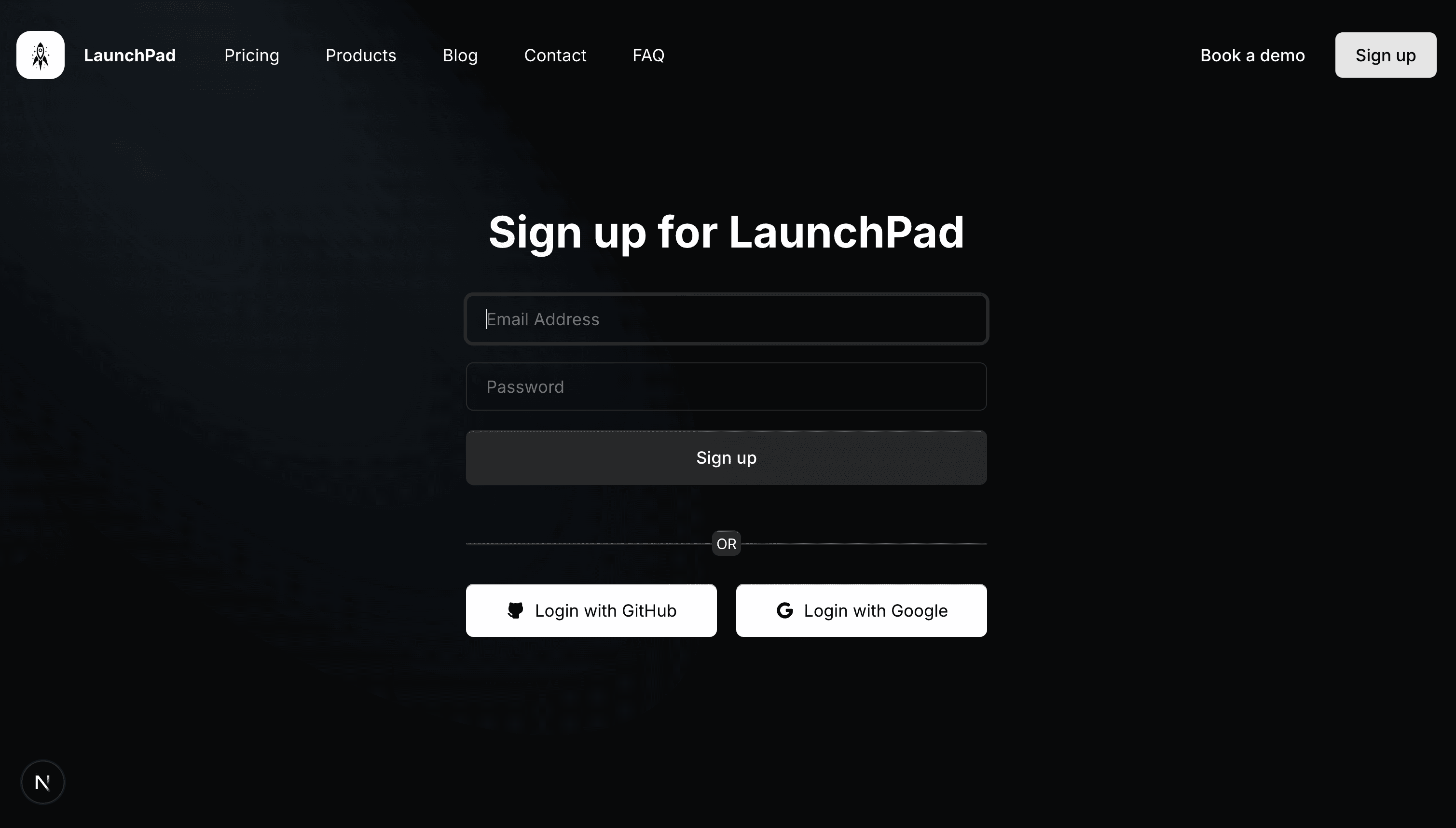
LaunchPad's existing register.tsx has a form but no handler. Replace it with a version that wires the form to signUp.email:
// next/components/register.tsx
'use client';

import {
  IconBrandGithubFilled,
  IconBrandGoogleFilled,
} from '@tabler/icons-react';
import { Link } from 'next-view-transitions';
import { useParams, useRouter } from 'next/navigation';
import React, { useState } from 'react';

import { Container } from './container';
import { Button } from './elements/button';
import { Logo } from './logo';
import { signIn, signUp } from '@/lib/auth-client';

export const Register = () => {
  const router = useRouter();
  const params = useParams<{ locale: string }>();
  const locale = params?.locale ?? 'en';
  const [name, setName] = useState('');
  const [email, setEmail] = useState('');
  const [password, setPassword] = useState('');
  const [error, setError] = useState<string | null>(null);
  const [isSubmitting, setIsSubmitting] = useState(false);

  async function handleSubmit(e: React.FormEvent<HTMLFormElement>) {
    e.preventDefault();
    setError(null);
    setIsSubmitting(true);

    const { error: signUpError } = await signUp.email({
      email,
      password,
      name: name || email,
    });

    setIsSubmitting(false);

    if (signUpError) {
      setError(signUpError.message ?? 'Sign up failed');
      return;
    }

    router.push('/');
    router.refresh();
  }

  async function handleSocial(provider: 'github' | 'google') {
    setError(null);
    const { error: socialError } = await signIn.social({
      provider,
      callbackURL: `/${locale}`,
    });
    if (socialError) {
      setError(socialError.message ?? `${provider} sign-in failed`);
    }
  }

  return (
    <Container className="h-screen max-w-lg mx-auto flex flex-col items-center justify-center">
      <Logo />
      <h1 className="text-xl md:text-4xl font-bold my-4">
        Sign up for LaunchPad
      </h1>

      <form className="w-full my-4" onSubmit={handleSubmit}>
        <input
          type="text"
          placeholder="Name"
          value={name}
          onChange={(e) => setName(e.target.value)}
          className="h-10 pl-4 w-full mb-4 rounded-md text-sm bg-charcoal border border-neutral-800 text-white placeholder-neutral-500 outline-none focus:outline-none active:outline-none focus:ring-2 focus:ring-neutral-800"
        />
        <input
          type="email"
          placeholder="Email Address"
          value={email}
          onChange={(e) => setEmail(e.target.value)}
          required
          className="h-10 pl-4 w-full mb-4 rounded-md text-sm bg-charcoal border border-neutral-800 text-white placeholder-neutral-500 outline-none focus:outline-none active:outline-none focus:ring-2 focus:ring-neutral-800"
        />
        <input
          type="password"
          placeholder="Password"
          value={password}
          onChange={(e) => setPassword(e.target.value)}
          required
          minLength={8}
          className="h-10 pl-4 w-full mb-4 rounded-md text-sm bg-charcoal border border-neutral-800 text-white placeholder-neutral-500 outline-none focus:outline-none active:outline-none focus:ring-2 focus:ring-neutral-800"
        />
        {error && (
          <p className="text-sm text-red-400 mb-4">{error}</p>
        )}
        <Button
          variant="muted"
          type="submit"
          className="w-full py-3"
          disabled={isSubmitting}
        >
          <span className="text-sm">{isSubmitting ? 'Signing up…' : 'Sign up'}</span>
        </Button>
      </form>

      <p className="text-sm text-neutral-400">
        Already have an account?{' '}
        <Link
          href={`/${locale}/sign-in`}
          className="text-white underline underline-offset-2 hover:text-secondary"
        >
          Sign in
        </Link>
      </p>

      <Divider />

      <div className="flex flex-col sm:flex-row gap-4 w-full">
        <button
          type="button"
          onClick={() => handleSocial('github')}
          className="flex flex-1 justify-center space-x-2 items-center bg-white px-4 py-3 rounded-md text-black hover:bg-white/80 transition duration-200 shadow-[0px_1px_0px_0px_#00000040_inset]"
        >
          <IconBrandGithubFilled className="h-4 w-4 text-black" />
          <span className="text-sm">Login with GitHub</span>
        </button>
        <button
          type="button"
          onClick={() => handleSocial('google')}
          className="flex flex-1 justify-center space-x-2 items-center bg-white px-4 py-3 rounded-md text-black hover:bg-white/80 transition duration-200 shadow-[0px_1px_0px_0px_#00000040_inset]"
        >
          <IconBrandGoogleFilled className="h-4 w-4 text-black" />
          <span className="text-sm">Login with Google</span>
        </button>
      </div>
    </Container>
  );
};

const Divider = () => {
  return (
    <div className="relative w-full py-8">
      <div className="w-full h-px bg-neutral-700 rounded-tr-xl rounded-tl-xl" />
      <div className="w-full h-px bg-neutral-800 rounded-br-xl rounded-bl-xl" />
      <div className="absolute inset-0 h-5 w-5 m-auto rounded-md px-3 py-0.5 text-xs bg-neutral-800 shadow-[0px_-1px_0px_0px_var(--neutral-700)] flex items-center justify-center">
        OR
      </div>
    </div>
  );
};
10.3 Add a sign-in page
LaunchPad doesn't have one. Create the route:
// next/app/[locale]/sign-in/page.tsx
import { AmbientColor } from '@/components/decorations/ambient-color';
import { SignInForm } from '@/components/sign-in-form';

export default function SignInPage() {
  return (
    <div className="relative overflow-hidden">
      <AmbientColor />
      <SignInForm />
    </div>
  );
}
And the form component — same shape as Register, but calling signIn.email({ email, password }) instead of signUp.email. Create next/components/sign-in-form.tsx:
// next/components/sign-in-form.tsx
'use client';
import {
IconBrandGithubFilled,
IconBrandGoogleFilled,
} from '@tabler/icons-react';
import { Link } from 'next-view-transitions';
import { useParams, useRouter } from 'next/navigation';
import React, { useState } from 'react';
import { Container } from './container';
import { Button } from './elements/button';
import { Logo } from './logo';
import { signIn } from '@/lib/auth-client';
export const SignInForm = () => {
const router = useRouter();
const params = useParams<{ locale: string }>();
const locale = params?.locale ?? 'en';
const [email, setEmail] = useState('');
const [password, setPassword] = useState('');
const [error, setError] = useState<string | null>(null);
const [isSubmitting, setIsSubmitting] = useState(false);
async function handleSubmit(e: React.FormEvent<HTMLFormElement>) {
e.preventDefault();
setError(null);
setIsSubmitting(true);
const { error: signInError } = await signIn.email({ email, password });
setIsSubmitting(false);
if (signInError) {
setError(signInError.message ?? 'Sign in failed');
return;
}
router.push('/');
router.refresh();
}
async function handleSocial(provider: 'github' | 'google') {
setError(null);
const { error: socialError } = await signIn.social({
provider,
callbackURL: `/${locale}`,
});
if (socialError) {
setError(socialError.message ?? `${provider} sign-in failed`);
}
}
return (
<Container className="h-screen max-w-lg mx-auto flex flex-col items-center justify-center">
<Logo />
<h1 className="text-xl md:text-4xl font-bold my-4">
Sign in to LaunchPad
</h1>
<form className="w-full my-4" onSubmit={handleSubmit}>
<input
type="email"
placeholder="Email Address"
value={email}
onChange={(e) => setEmail(e.target.value)}
required
className="h-10 pl-4 w-full mb-4 rounded-md text-sm bg-charcoal border border-neutral-800 text-white placeholder-neutral-500 outline-none focus:outline-none active:outline-none focus:ring-2 focus:ring-neutral-800"
/>
<input
type="password"
placeholder="Password"
value={password}
onChange={(e) => setPassword(e.target.value)}
required
className="h-10 pl-4 w-full mb-4 rounded-md text-sm bg-charcoal border border-neutral-800 text-white placeholder-neutral-500 outline-none focus:outline-none active:outline-none focus:ring-2 focus:ring-neutral-800"
/>
{error && <p className="text-sm text-red-400 mb-4">{error}</p>}
<Button
variant="muted"
type="submit"
className="w-full py-3"
disabled={isSubmitting}
>
<span className="text-sm">{isSubmitting ? 'Signing in…' : 'Sign in'}</span>
</Button>
</form>
<p className="text-sm text-neutral-400">
Don't have an account?{' '}
<Link
href={`/${locale}/sign-up`}
className="text-white underline underline-offset-2 hover:text-secondary"
>
Sign up
</Link>
</p>
<Divider />
<div className="flex flex-col sm:flex-row gap-4 w-full">
<button
type="button"
onClick={() => handleSocial('github')}
className="flex flex-1 justify-center space-x-2 items-center bg-white px-4 py-3 rounded-md text-black hover:bg-white/80 transition duration-200 shadow-[0px_1px_0px_0px_#00000040_inset]"
>
<IconBrandGithubFilled className="h-4 w-4 text-black" />
<span className="text-sm">Login with GitHub</span>
</button>
<button
type="button"
onClick={() => handleSocial('google')}
className="flex flex-1 justify-center space-x-2 items-center bg-white px-4 py-3 rounded-md text-black hover:bg-white/80 transition duration-200 shadow-[0px_1px_0px_0px_#00000040_inset]"
>
<IconBrandGoogleFilled className="h-4 w-4 text-black" />
<span className="text-sm">Login with Google</span>
</button>
</div>
</Container>
);
};
const Divider = () => {
return (
<div className="relative w-full py-8">
<div className="w-full h-px bg-neutral-700 rounded-tr-xl rounded-tl-xl" />
<div className="w-full h-px bg-neutral-800 rounded-br-xl rounded-bl-xl" />
<div className="absolute inset-0 h-5 w-5 m-auto rounded-md px-3 py-0.5 text-xs bg-neutral-800 shadow-[0px_-1px_0px_0px_var(--neutral-700)] flex items-center justify-center">
OR
</div>
</div>
);
};10.4 Add a user menu to the navbar
// next/components/navbar/user-menu.tsx
'use client';

import { useRouter } from 'next/navigation';
import { useState } from 'react';

import { Button } from '@/components/elements/button';
import { signOut, useSession } from '@/lib/auth-client';

export const UserMenu = ({ locale }: { locale: string }) => {
  const router = useRouter();
  const { data: session, isPending } = useSession();
  const [isSigningOut, setIsSigningOut] = useState(false);

  if (isPending) return null;
  if (!session?.user) return null;

  const displayName = session.user.name || session.user.email;

  async function handleSignOut() {
    setIsSigningOut(true);
    await signOut();
    setIsSigningOut(false);
    router.push(`/${locale}`);
    router.refresh();
  }

  return (
    <div className="flex items-center gap-2">
      <span className="text-white text-sm whitespace-nowrap">Hi {displayName}</span>
      <Button variant="simple" onClick={handleSignOut} disabled={isSigningOut}>
        {isSigningOut ? 'Logging out…' : 'Logout'}
      </Button>
    </div>
  );
};
10.5 Mount UserMenu in the desktop and mobile navbars
Replace each navbar file with the version below — the only behavioral change is wrapping the rightNavbarItems map in session?.user ? <UserMenu /> : (...) so the menu shows when signed in and the original sign-up/sign-in buttons show otherwise.
next/components/navbar/desktop-navbar.tsx
// next/components/navbar/desktop-navbar.tsx
'use client';

import {
  AnimatePresence,
  motion,
  useMotionValueEvent,
  useScroll,
} from 'framer-motion';
import { Link } from 'next-view-transitions';
import { useState } from 'react';

import { LocaleSwitcher } from '../locale-switcher';
import { NavbarItem } from './navbar-item';
import { UserMenu } from './user-menu';
import { Button } from '@/components/elements/button';
import { Logo } from '@/components/logo';
import { useSession } from '@/lib/auth-client';
import { cn } from '@/lib/utils';

type Props = {
  leftNavbarItems: {
    URL: string;
    text: string;
    target?: string;
  }[];
  rightNavbarItems: {
    URL: string;
    text: string;
    target?: string;
  }[];
  logo: any;
  locale: string;
};

export const DesktopNavbar = ({
  leftNavbarItems,
  rightNavbarItems,
  logo,
  locale,
}: Props) => {
  const { scrollY } = useScroll();
  const { data: session } = useSession();

  const [showBackground, setShowBackground] = useState(false);

  useMotionValueEvent(scrollY, 'change', (value) => {
    if (value > 100) {
      setShowBackground(true);
    } else {
      setShowBackground(false);
    }
  });
  return (
    <motion.div
      className={cn(
        'w-full flex relative justify-between px-4 py-3 rounded-md  transition duration-200 bg-transparent mx-auto'
      )}
      animate={{
        width: showBackground ? '80%' : '100%',
        background: showBackground ? 'var(--neutral-900)' : 'transparent',
      }}
      transition={{
        duration: 0.4,
      }}
    >
      <AnimatePresence>
        {showBackground && (
          <motion.div
            key={String(showBackground)}
            initial={{ opacity: 0 }}
            animate={{ opacity: 1 }}
            transition={{
              duration: 1,
            }}
            className="absolute inset-0 h-full w-full bg-neutral-900 pointer-events-none [mask-image:linear-gradient(to_bottom,white,transparent,white)] rounded-full"
          />
        )}
      </AnimatePresence>
      <div className="flex flex-row gap-2 items-center">
        <Logo locale={locale} image={logo?.image} />
        <div className="flex items-center gap-1.5">
          {leftNavbarItems.map((item) => (
            <NavbarItem
              href={`/${locale}${item.URL}` as never}
              key={item.text}
              target={item.target}
            >
              {item.text}
            </NavbarItem>
          ))}
        </div>
      </div>
      <div className="flex space-x-2 items-center">
        <LocaleSwitcher currentLocale={locale} />

        {session?.user ? (
          <UserMenu locale={locale} />
        ) : (
          rightNavbarItems.map((item, index) => (
            <Button
              key={item.text}
              variant={
                index === rightNavbarItems.length - 1 ? 'primary' : 'simple'
              }
              as={Link}
              href={`/${locale}${item.URL}`}
            >
              {item.text}
            </Button>
          ))
        )}
      </div>
    </motion.div>
  );
};
next/components/navbar/mobile-navbar.tsx
// next/components/navbar/mobile-navbar.tsx
'use client';

import { useMotionValueEvent, useScroll } from 'framer-motion';
import { Link } from 'next-view-transitions';
import { useState } from 'react';
import { IoIosMenu, IoIosClose } from 'react-icons/io';

import { LocaleSwitcher } from '../locale-switcher';
import { UserMenu } from './user-menu';
import { Button } from '@/components/elements/button';
import { Logo } from '@/components/logo';
import { useSession } from '@/lib/auth-client';
import { cn } from '@/lib/utils';

type Props = {
  leftNavbarItems: {
    URL: string;
    text: string;
    target?: string;
  }[];
  rightNavbarItems: {
    URL: string;
    text: string;
    target?: string;
  }[];
  logo: any;
  locale: string;
};

export const MobileNavbar = ({
  leftNavbarItems,
  rightNavbarItems,
  logo,
  locale,
}: Props) => {
  const [open, setOpen] = useState(false);
  const { data: session } = useSession();

  const { scrollY } = useScroll();

  const [showBackground, setShowBackground] = useState(false);

  useMotionValueEvent(scrollY, 'change', (value) => {
    if (value > 100) {
      setShowBackground(true);
    } else {
      setShowBackground(false);
    }
  });

  return (
    <div
      className={cn(
        'flex justify-between bg-transparent items-center w-full rounded-md px-2.5 py-1.5 transition duration-200',
        showBackground &&
          ' bg-neutral-900  shadow-[0px_-2px_0px_0px_var(--neutral-800),0px_2px_0px_0px_var(--neutral-800)]'
      )}
    >
      <Logo image={logo?.image} />

      <IoIosMenu
        className="text-white h-6 w-6"
        onClick={() => setOpen(!open)}
      />

      {open && (
        <div className="fixed inset-0 bg-black z-50 flex flex-col items-start justify-start space-y-10  pt-5  text-xl text-zinc-600  transition duration-200 hover:text-zinc-800">
          <div className="flex items-center justify-between w-full px-5">
            <Logo locale={locale} image={logo?.image} />
            <div className="flex items-center space-x-2">
              <LocaleSwitcher currentLocale={locale} />
              <IoIosClose
                className="h-8 w-8 text-white"
                onClick={() => setOpen(!open)}
              />
            </div>
          </div>
          <div className="flex flex-col items-start justify-start gap-[14px] px-8">
            {leftNavbarItems.map((navItem: any, idx: number) => (
              <>
                {navItem.children && navItem.children.length > 0 ? (
                  <>
                    {navItem.children.map((childNavItem: any, idx: number) => (
                      <Link
                        key={`link=${idx}`}
                        href={`/${locale}${childNavItem.URL}`}
                        onClick={() => setOpen(false)}
                        className="relative max-w-[15rem] text-left text-2xl"
                        suppressHydrationWarning
                      >
                        <span className="block text-white">
                          {childNavItem.text}
                        </span>
                      </Link>
                    ))}
                  </>
                ) : (
                  <Link
                    key={`link=${idx}`}
                    href={`/${locale}${navItem.URL}`}
                    onClick={() => setOpen(false)}
                    className="relative"
                    suppressHydrationWarning
                  >
                    <span className="block text-[26px] text-white">
                      {navItem.text}
                    </span>
                  </Link>
                )}
              </>
            ))}
          </div>
          <div className="flex flex-row w-full items-start gap-2.5  px-8 py-4 ">
            {session?.user ? (
              <UserMenu locale={locale} />
            ) : (
              rightNavbarItems.map((item, index) => (
                <Button
                  key={item.text}
                  variant={
                    index === rightNavbarItems.length - 1 ? 'primary' : 'simple'
                  }
                  as={Link}
                  href={`/${locale}${item.URL}`}
                >
                  {item.text}
                </Button>
              ))
            )}
          </div>
        </div>
      )}
    </div>
  );
};
Shortcut: since the frontend changes are scoped to those five files, the fastest way to apply this step is to copy them from the
launchpad-better-auth-examplerepo into yournext/folder. The Strapi-side configuration is what makes this tutorial different from a generic Better Auth setup — the frontend is just a stock Better Auth React client wiring.
Step 11 — Reset and Reseed the Database
Because we changed the schema (new ba_* tables, new api_permissions_* tables), wipe the local dev DB and reimport the seed data:
rm -f strapi/.tmp/data.db
cd strapi && yes | yarn seed
(If you're using PostgreSQL or another database, drop and recreate the database instead of deleting .tmp/data.db.)
Step 12 — Boot It Up
From the repo root:
yarn devYou should see Strapi start cleanly with no plugin errors. Open:
- http://localhost:1337/admin — log in, you'll see a new Better Auth tab in the left nav (the dashboard). Under Settings → API Permissions you'll see the role manager with Public and Authenticated pre-seeded.
- http://localhost:3000 — the LaunchPad marketing site.
You will have to create a new Strapi Admin user.
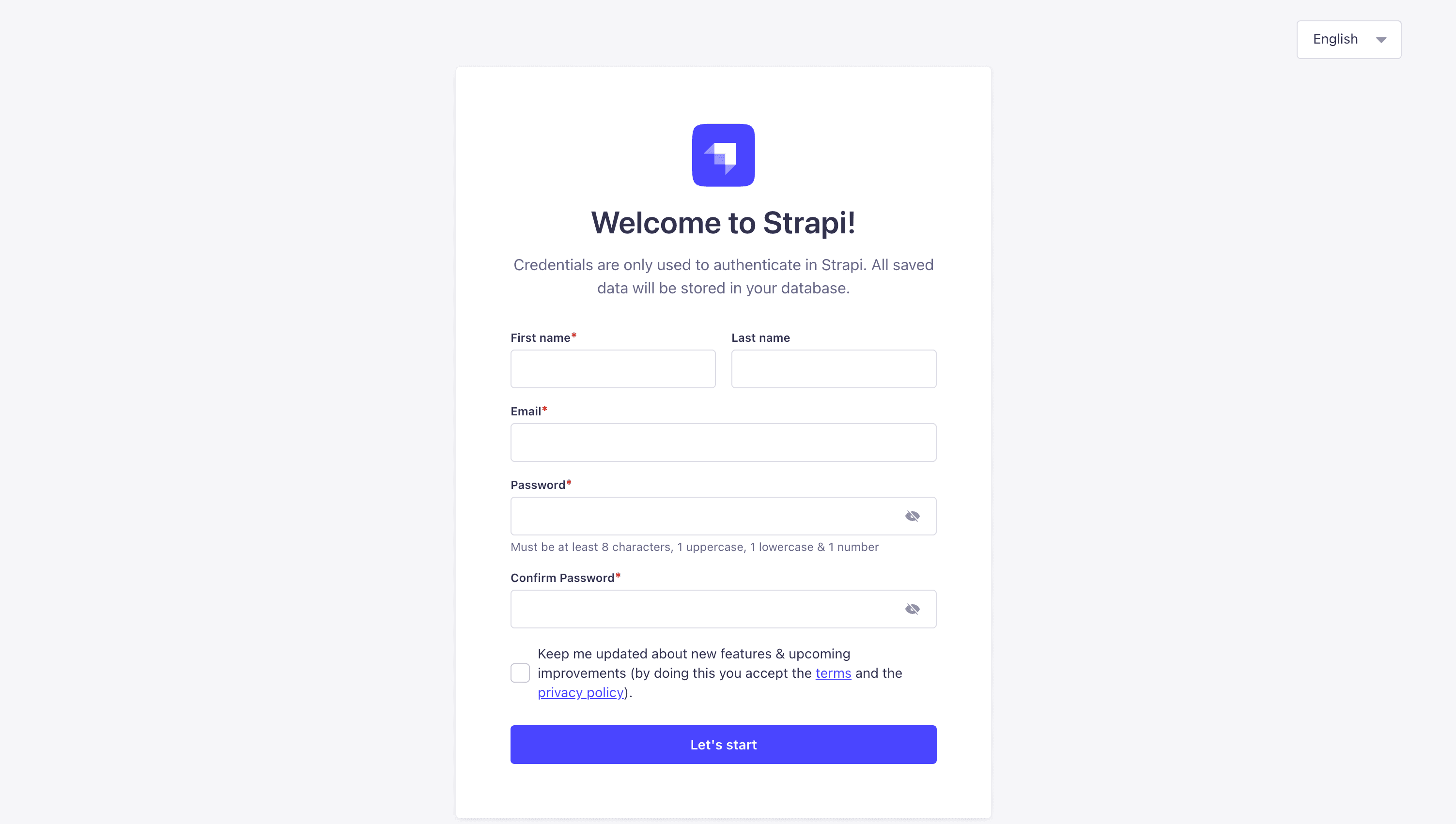
Once created, you should be able to login and got to the Better Auth dashboard.
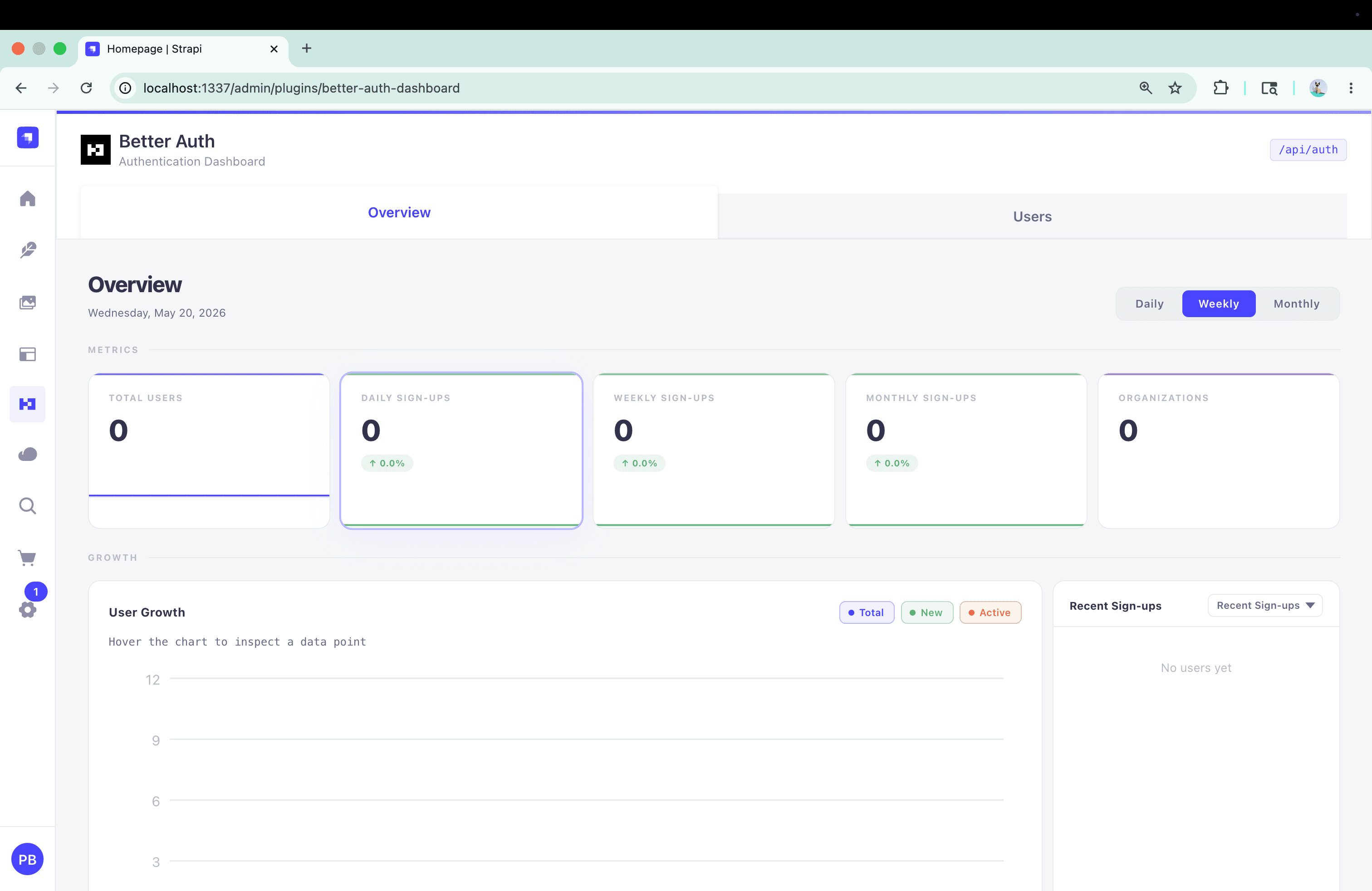
Step 13 — Test the Sign-Up Flow
Navigate to http://localhost:3000/en/sign-up, fill in name / email / password, and submit. You should see:
- A
POSTtohttp://localhost:1337/api/auth/sign-up/emailreturning200with{token, user: {id, name, email, ...}} - A session cookie set on
localhost:1337 - A redirect to
/ - The navbar updates to "Hi {name}" with a Logout button
curl -X POST http://localhost:1337/api/auth/sign-up/email \
  -H 'content-type: application/json' \
  -d '{"email":"test@example.com","password":"testpass1234","name":"Test"}'
You should get a 200 with a token and user object.
Then jump to the Strapi admin's Better Auth tab — your new user appears in the user list, with metrics, growth chart, and the ability to revoke sessions or ban accounts.
What You Get for the Effort
After all that, here's what's different from users-permissions:
| Concern | users-permissions | Better Auth stack |
|---|---|---|
| Sign-up endpoint | /api/auth/local/register | /api/auth/sign-up/email |
| Sign-in endpoint | /api/auth/local | /api/auth/sign-in/email |
| User content type | plugin::users-permissions.user | plugin::better-auth.user (table ba_user) |
| Role/permission UI | Settings → Users & Permissions → Roles | Settings → API Permissions → Roles |
| Admin user management | Content Manager → User | Better Auth dashboard tab (search, metrics, sessions, ban) |
| Social providers | requires custom controller code | one line per provider in auth.ts |
| Two-factor auth | not supported out of the box | one line: add twoFactor() plugin |
| Magic links | requires custom code | one line: add magicLink() plugin |
| Frontend SDK | none — fetch by hand | better-auth/react: useSession, signIn, signUp, signOut |
The dashboard alone is a big quality-of-life upgrade — DAU / WAU / MAU, growth chart, cohort retention, per-user session list with revoke buttons.
Troubleshooting
A few sharp edges worth being aware of:
Error: The 'users-permissions' plugin is installed.at Strapi boot — you didn't fully remove@strapi/plugin-users-permissionsin Step 3. The plugin checks for the package, not the enabled state, so disabling inconfig/plugins.tsisn't enough. Remove it frompackage.jsonand reinstall.TypeError: z.email is not a functionduring schema generation — you skipped thezod@^4.1.12install. Add it and reinstall.401 Unauthorizedon every/api/*content endpoint — boot Strapi once after schema generation so the bootstrap insrc/index.tscan seed the Public role's permissions. If you're still seeing 401s, check Settings → API Permissions → Roles → Public in the admin and togglefind/findOneon each content type manually.
Where to Go Next
- The full reproducible setup with every file change lives in the standalone
PaulBratslavsky/launchpad-better-auth-examplerepo. Treat it as the canonical reference implementation. Usegit diffagainststrapi/LaunchPad@mainto see the exact set of edits. - The companion
BETTER-AUTH-SETUP.mdin that repo is a concise reference if you don't want the narrative version. - The
better-auth-setupClaude Code skill automates these steps against any Strapi + Next.js project. - For social providers, plug them into
src/lib/auth.ts— see the Better Auth providers docs. - For 2FA, magic links, or organizations, add the corresponding Better Auth plugins to
src/lib/auth.tsand re-runnpx -y @better-auth/cli generate --config src/lib/auth.ts --yes. - File issues against the community plugins on github.com/strapi-community/plugin-better-auth — they're actively maintained and the maintainers respond fast.
This is the direction the Strapi team is moving — giving you the option to use Better Auth in your projects instead of users-permissions. Thank you for trying out the feature. Please share feedback, ideas, or bug reports in the strapi-community/plugin-better-auth repo — that's where the maintainers triage issues for all three plugins.
Citations
- Strapi LaunchPad: https://github.com/strapi/LaunchPad
- strapi-community/plugin-better-auth monorepo: https://github.com/strapi-community/plugin-better-auth
- plugin-better-auth source (register guard): https://github.com/strapi-community/plugin-better-auth/blob/main/plugins/plugin-better-auth/server/src/register.ts
- plugin-api-permissions README: https://github.com/strapi-community/plugin-better-auth/blob/main/plugins/plugin-api-permissions/README.md
- plugin-better-auth-dashboard README: https://github.com/strapi-community/plugin-better-auth/blob/main/plugins/plugin-better-auth-dashboard/README.md
- Better Auth docs site: https://strapi-community.github.io/plugin-better-auth/docs/intro
- Better Auth installation page: https://strapi-community.github.io/plugin-better-auth/docs/better-auth/installation
- Better Auth schema page: https://strapi-community.github.io/plugin-better-auth/docs/better-auth/schema
- Better Auth client setup page: https://strapi-community.github.io/plugin-better-auth/docs/better-auth/client-setup
- Better Auth upstream library: https://better-auth.com
- Better Auth database concepts: https://better-auth.com/docs/concepts/database
- Better Auth JWT plugin: https://better-auth.com/docs/plugins/jwt
- 1.0.0-beta.1 release notes: https://github.com/strapi-community/plugin-better-auth/releases/tag/1.0.0-beta.1
- Strapi v5 documentation: https://docs.strapi.io