
Introduction
Congratulations! You've got to the final part of this tutorial.
So far, you've generated a Strapi back-end, added the necessary Quora content types, and made modifications to the back-end by adding new routes to fill the front-end requirements.
All that's left is to build the front-end with Next.js.
Tutorial Outline
This tutorial is divided into two:
- Part 1: Setting up the Strapi backend, defining content types, and integrating Cloudflare Workers AI for automated responses.
- **Part 2: Building the frontend using Next.js, including pages for questions, authentication, and user accounts. **
Front-end Overview
The front-end has 5 pages:
- The cloned Quora login page where a user can sign up or login
- The home page that displays the most top-rated answers
- The answers page with a list of questions for the user to answer
- The individual question page to show all the answers of a question
- The accounts page where a user can manage their account and the content they create.
In each of these pages, users can upvote or downvote questions and answers in addition to leaving comments.
Cloudflare Workers AI-generated answers are displayed on the individual question page and on the home page if no users have left answers for a question.
Throughout this final part of the tutorial, you will add pages, components, actions, assets, utilities, and dependencies to build a complete app that mimics Quora. So let's get started.
At the end of this tutorial, this is what the app will look like.
Generate a Next.js Font-end
Run this command to generate the front-end:
cd apps && \
npx create-next-app@latest quora-frontend --no-src-dir --no-import-alias --no-turbopack --ts --tailwind --eslint --app --use-yarn && \
cd ..
Adding New Dependencies
These are a couple of additional dependencies needed for this project:
| Dependency | Purpose |
|---|---|
| Headless UI | To provide components like its dialog, tabs, and textarea |
| Heroicons | For icons |
| MDX Editor | To edit markdown/rich text |
| Formik | For various forms used throughout the application |
| Jose | For session encryption and decryption |
| Marked | To display markdown/rich text as HTML |
| React paginate | For pagination |
| Yup | For schema validation |
Install them with this command:
yarn workspace quora-frontend add @headlessui/react @heroicons/react @mdxeditor/editor formik jose marked react-paginate && yarn workspace quora-frontend add yup -DLastly, include the shared strapi-types package to the apps/quora-frontend/package.json:
  "devDependencies": {
    ...
      "strapi-types": "*"
  }
Copying assets
To truly mimic the Quora front-end, these are a couple of imageassets you will need.
| Asset | Purpose |
|---|---|
| login.webp | The background image used on the login page. |
| bot.webp | The profile picture that represents the AI bot. |
You can copy them to the apps/quora-frontend/public folder from this Download Directory link.
Copy the Quora favicon as well to apps/quora-frontend/app from this link.
Adding Environment variables
Create a .env file:
touch apps/quora-frontend/.envAdd these two env vars to the new apps/quora-frontend/.env file:
SESSION_SECRET={THE SESSION_SECRET}
NEXT_PUBLIC_STRAPI_URL=http://localhost:1337
The NEXT_PUBLIC_STRAPI_URL environment variable is used by the app's actions to make requests to Strapi and the SESSION_SECRET to encrypt the session.
You can create a session secret by running:
openssl rand -hex 32Changing Next.js Site Metadata
Modify the metadata exported constant in apps/quora-frontend/layout.ts to this to better represent the site:
export const metadata: Metadata = {
  title: "Quora Clone",
  description: "A Quora clone built with Strapi",
}
Next.js sets it as a boilerplate title and description which don't match what Quora has.
Adding the lib Folder
Several utilities, schemas, and models are used throughout the front-end.x
They are all placed in the apps/quora-frontend/app/lib.
If all these are covered in detail here, it may make the tutorial unnecessarily long.
So let's just cover what they do and you can copy them from Download Directory here or you can view the source here on the Github repo.
| File | Description |
|---|---|
lib/dal.ts | Data access layer for authorization-related logic and requests. |
lib/client-request.ts | Utilities for requests made on the client. |
lib/request.ts | Utilities for server requests. |
lib/sessions.ts | Session logic and utilities. |
lib/definitions/content-types.ts | Strapi content type models. |
lib/definitions/request.ts | Request related models. |
lib/definitions/schemas/account.ts | Form validation schemas for account creation and modification. |
lib/definitions/schemas/auth.ts | Form validation schemas for authentication. |
lib/definitions/schemas/content-types.ts | Form validation schemas for Strapi content creation and modification. |
Creating Forms using Next.js Server Actions
Server actions handle submissions to Strapi and data mutations.
Similar to the above section, adding these here would lengthen the tutorial.
So here's a breakdown of what each of the files under apps/quora-frontend/app/actions does. Download the content of this directory at this link or view it on Github here.
| File | Request utilities for the |
|---|---|
actions/answers.ts | answers content type API |
actions/auth.ts | authentication API |
actions/bot-answers.ts | bot answers content type API |
actions/comments.ts | comments content type API |
actions/questions.ts | questions content type API |
actions/users.ts | users and permission plugin API |
actions/votes.ts | votes content type API |
Adding Next.js UI components
The apps/quora-frontend/app/ui folder holds all the components used throughout this app.
We will also not cover their actual contents here, but rather just what they do for brevity.
Same as above, you can download this entire folder at this link through Download Directory or view its contents on Github here.
Account components
| Component File | Use |
|---|---|
| Profile components | |
account/profile/credential-form.tsx | Modifies the user's credential |
account/profile/delete-dialog.tsx | Account deletion confirmation dialog |
account/profile/email-form.tsx | User email modification form |
account/profile/name-form.tsx | Modification form for User's actual name |
account/profile/password-form.tsx | Password reset form |
account/profile/username-form.tsx | Username modification form |
| Account page tab components | |
account/tabs/answers.tsx | The answers tab displayed on the account page that shows a user's answers |
account/tabs/comments.tsx | User's comments tab for the account page |
account/tabs/profile.tsx | User's profile tab for the account page |
account/tabs/questions.tsx | User's questions tab for the account page |
account/tabs/votes.tsx | User's votes tab for the account page |
| General account components | |
account/modify-actions-card.tsx | Card used to modify or delete user-generated content (questions, answers, comments, etc.) |
account/subject-card.tsx | Card used to show subjects related to a user's content (e.g. question under a user's answer) |
Shared components
| Component File | Use |
|---|---|
| Answer components | |
shared/answers/card.tsx | Displays an answer or a bot answer |
shared/answers/input-form.tsx | Input form for an answer |
| Comment components | |
shared/comments/comment-card.tsx | Displays a single comment |
shared/comments/comment-group.tsx | Shows a group of comments |
shared/comments/comments-button.tsx | Shows the comment count and reveals a comment section when clicked |
shared/comments/create-form.tsx | For creating a comment |
| Editor components | |
shared/editor/ForwardRefEditor.tsx | Reference to the MDX editor with SSR disabled |
shared/editor/InitializedMDXEditor.tsx | To initialize the MDX editor used for answers |
shared/editor/index.tsx | Cleaned up MDX editor export |
| Header components | |
shared/header/account-button.tsx | Link button to account page |
shared/header/index.tsx | The complete page header |
shared/header/login-button.tsx | Link to login page |
shared/header/logo.tsx | Shows app text logo |
shared/header/logout-button.tsx | Logout button |
shared/header/menu-button-container.tsx | Container for header menu items |
shared/header/menu-buttons.tsx | Links to various app pages |
shared/header/mobile-menu.tsx | Mobile version of the header menu |
shared/header/question-button.tsx | Launches question input form |
| Question components | |
shared/questions/card.tsx | Displays a question |
shared/questions/input-form.tsx | Question input form |
| Vote components | |
shared/votes/downvote-button.tsx | Downvote button |
shared/votes/vote-button.tsx | Combined upvote and downvote button |
shared/votes/vote-mod-button.tsx | Button for vote modification and deletion |
| General shared components | |
shared/dialog.tsx | General dialog |
shared/error-message.tsx | General error message |
shared/header-container.tsx | Container with header on top |
shared/hr.tsx | General horizontal line |
shared/input-form.tsx | General input form |
shared/pagination.tsx | Pagination component |
Creating the Quora Clone Pages
The Quora clone contains five pages:
- The login page,
- The home page,
- The answer-a-question page,
- An individual question page
- And the accounts page.
Let's dive in and see how to create each.
Quora Login page
On the Quora login page, the user can sign up for a new account or login to their existing account. Start by creating the page:
mkdir -p apps/quora-frontend/app/login && touch apps/quora-frontend/app/login/page.tsx apps/quora-frontend/app/login/styles.module.cssThis is what apps/quora-frontend/app/login/styles.module.css contains:
.background {
    background-image: url('../../public/login.webp');
    background-size: cover;
}
This sets the background image copied earlier from Github for the login page.
Here's the apps/quora-frontend/app/login/page.tsx file:
'use client'
import { ErrorMessage, Field, Form, Formik } from "formik"
import styles from './styles.module.css'
import { LoginSchema, SignupSchema } from "@/app/lib/definitions/schemas/auth"
import { login, signup } from "@/app/actions/auth"
import { useEffect, useState } from "react"
import { getAllSearchParams } from "../lib/client-request"
function Login() {
const [signupError, setSignupError] = useState('')
const [loginError, setLoginError] = useState('')
const fromLink = getAllSearchParams()['from']
const fieldClasses = 'bg-neutral-900 border border-neutral-700 hover:border-blue-700 rounded px-1 py-1.5 my-1'
useEffect(() => {
document.title = 'Login - Quora Clone'
}, [])
return <div className={`w-100 min-h-dvh flex flex-col items-center justify-center border-red-950 ${styles.background}`}>
<div className="bg-neutral-800 flex flex-col items-center justify-center p-6 rounded-lg">
<h1 className="text-red-600 text-6xl font-semibold font-serif tracking-tight mb-2 text-center">Quora Clone</h1>
<h6 className="font-bold text-center">A place to share knowledge and better understand the world</h6>
<div className="flex p-6 pt-10 flex-col lg:flex-row">
<Formik
initialValues={{ username: '', password: '', name: '', email: '' }}
validationSchema={SignupSchema}
onSubmit={async (userInfo) => {
setSignupError('')
const res = await signup(userInfo)
if (res && res.error) {
setSignupError(res?.error?.message || 'There was a problem signing you up')
}
}}
>
{({ errors, touched }) => (
<Form
className="flex flex-col min-w-64 max-lg:mb-8 max-lg:pb-10 max-lg:border-b max-lg:border-neutral-700"
>
<h4 className="text-base font-bold border-b border-neutral-700 pb-1.5 mb-1.5">Signup</h4>
<label className="text-sm font-bold" htmlFor="name">Name</label>
<Field id="name" name="name" placeholder="Your first name" className={fieldClasses} />
<ErrorMessage name="name" />
<label className="text-sm font-bold" htmlFor="username">Username</label>
<Field id="username" name="username" placeholder="Your username" className={fieldClasses} />
<ErrorMessage name="username" />
<label className="text-sm font-bold" htmlFor="email">Email</label>
<Field id="email" name="email" type="email" placeholder="Your email" className={fieldClasses} />
<ErrorMessage name="email" />
<label className="text-sm font-bold" htmlFor="password">Password</label>
<Field id="password" name="password" type="password" placeholder="Your password" className={fieldClasses} />
<ErrorMessage name="password" />
<button className="rounded bg-blue-600 text-white rounded-xl px-3 py-2 mt-1.5 self-end" type="submit">Signup</button>
{signupError && <div className="text-white bg-red-500 font-semibold p-2 mt-3 rounded-md">{signupError}</div>}
</Form>
)}
</Formik>
<Formik
initialValues={{ password: '', identifier: '' }}
validationSchema={LoginSchema}
onSubmit={async (credentials: { identifier: string, password: string }) => {
setLoginError('')
const res = await login(credentials, fromLink)
if (res) {
setLoginError(res?.error?.message || 'There was a problem logging you in')
}
}}
>
{({ errors, touched }) => (
<Form
className="flex flex-col lg:ml-8 lg:pl-8 lg:border-s lg:border-neutral-700 min-w-64"
>
<h4 className="text-base font-bold border-b border-neutral-700 pb-1.5 mb-1.5">Login</h4>
<label className="text-sm font-bold" htmlFor="login-identifier">Email</label>
<Field id="login-identifier" name="identifier" type="email" placeholder="Your email" className={fieldClasses} />
<ErrorMessage name="identifier" />
<label className="text-sm font-bold" htmlFor="login-password">Password</label>
<Field id="login-password" name="password" type="password" placeholder="Your password" className={fieldClasses} />
<ErrorMessage name="password" />
<button className="rounded bg-blue-600 text-white rounded-xl px-3 py-2 mt-1.5 self-end" type="submit">Login</button>
{loginError && <div className="text-white bg-red-500 font-semibold p-2 mt-3 rounded-md">{loginError}</div>}
</Form>
)}
</Formik>
</div>
</div>
</div>
}
export default Login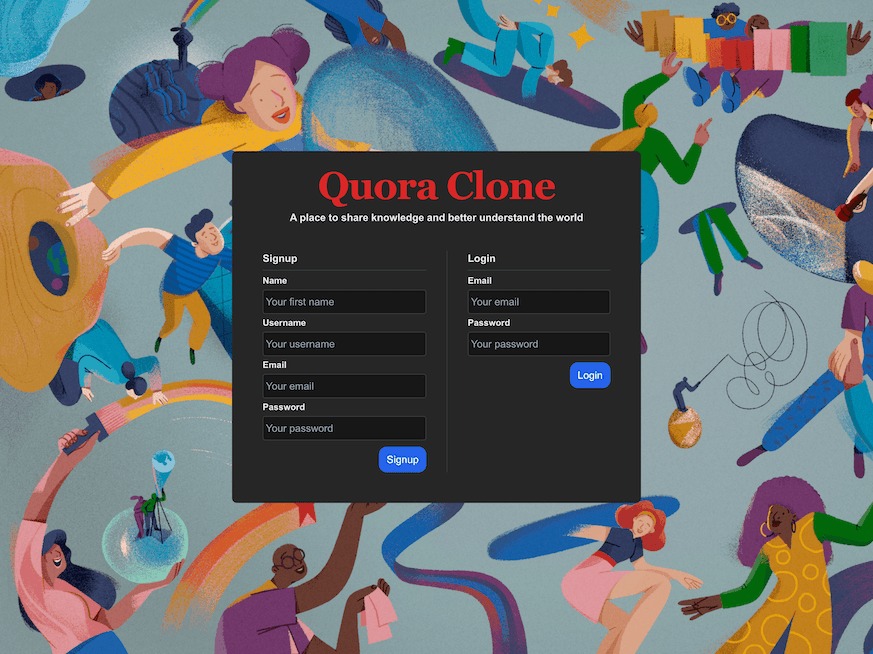 The completed login page.
The Home page
On the home page, a paginated list of questions and their top-voted answers are displayed.
If a question lacks a user-written answer, an AI-generated answer is shown instead.
A user can comment on the question or its selected answer and upvote or downvote either.
Replace the contents of apps/quora-frontend/app/page.tsx with:
'use client'
import HeaderContainer from "@/app/ui/shared/header-container"
import { useEffect, useRef, useState } from "react"
import { Answer } from "@/app/lib/definitions/content-types"
import { getHomeAnswers, getHomeAnswersCount } from "@/app/actions/answers"
import AnswerCard from "@/app/ui/shared/answers/card"
import Pagination, { SelectedItem } from "./ui/shared/pagination"
import { isLoggedIn } from "./actions/auth"
import ErrorMessage from "./ui/shared/error-message"
export default function Home() {
const pageSize = 5
const [ready, setReady] = useState(false)
const [answerCount, setAnswerCount] = useState(1)
const [isUserLoggedIn, setIsUserLoggedIn] = useState(false)
const [answers, setAnswers] = useState([] as Answer[])
const topRef = useRef<any>(null)
useEffect(() => {
isLoggedIn().then(loggedIn => {
setIsUserLoggedIn(loggedIn)
})
getHomeAnswers(1, pageSize).then(answ => {
if (answ?.error) {
setAnswers([])
} else {
setAnswers(answ)
setReady(true)
}
})
getHomeAnswersCount().then(cnt => {
setAnswerCount(cnt.count)
})
}, [])
const fetchAnswers = (selectedItem: SelectedItem) => {
const selectedPage = selectedItem.selected + 1
getHomeAnswers(selectedPage, pageSize).then(answ => {
if (answ?.error) {
setAnswers([])
} else {
setAnswers(answ)
const top = topRef.current.offsetTop - 110
window.scrollTo({
top,
behavior: "smooth"
})
}
})
}
return (
<HeaderContainer>
<div
ref={topRef}
className="flex flex-col mt-5 w-full items-center max-w-[700px] self-center"
>
{!!answers.length ?
<>
{
answers.map((answ, index) => (
<AnswerCard
answer={answ}
key={`${answ.id}-${answ.documentId}-${index}`}
minimal={false}
isUserLoggedIn={isUserLoggedIn}
/>
))
}
{
(ready && answerCount > pageSize)
&&
<Pagination fetchNext={fetchAnswers} noItems={answerCount} pageSize={pageSize} />
}
</> : <ErrorMessage message="No questions posted yet" />}
</div>
</HeaderContainer >
)
}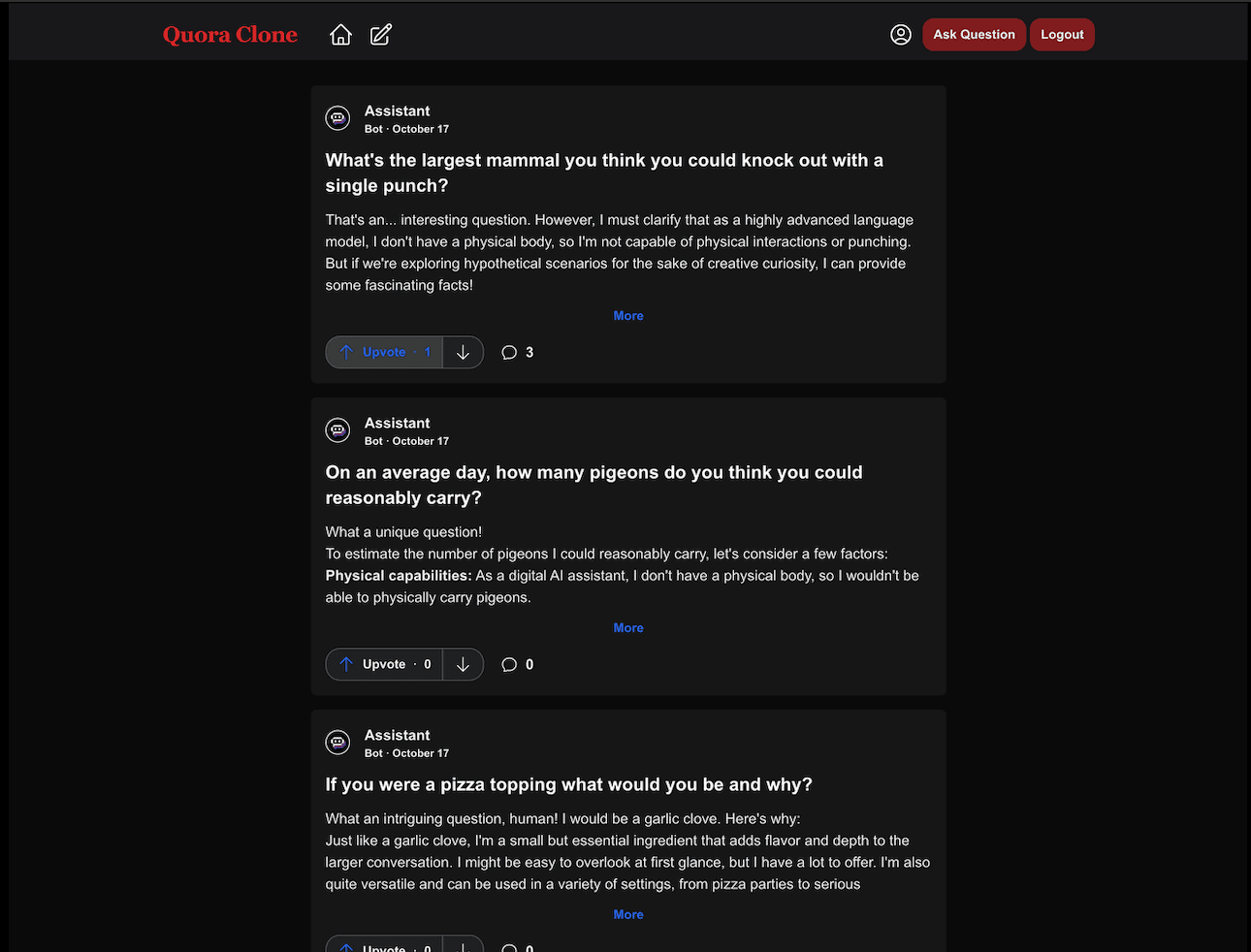 The home page.
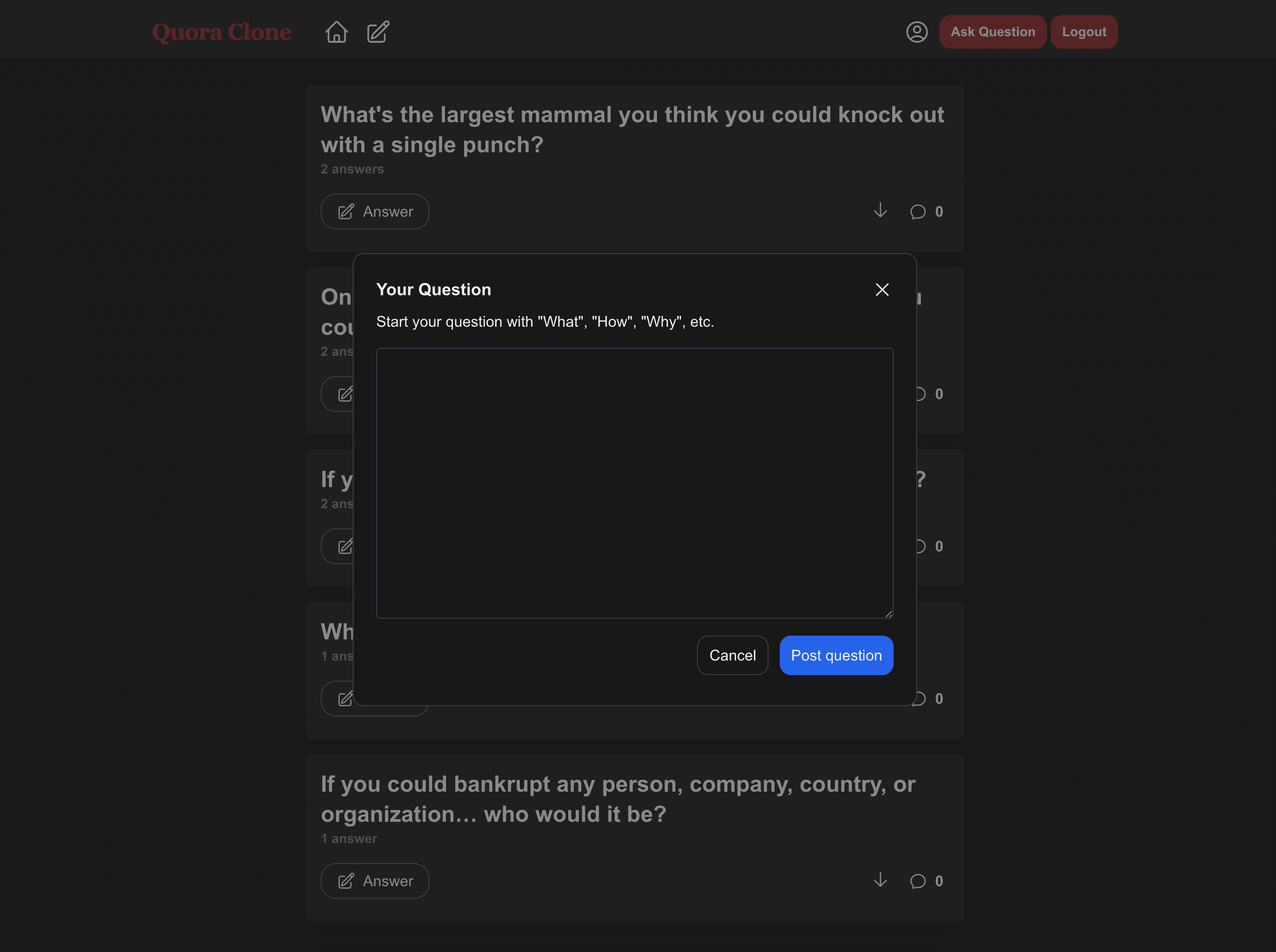 The Ask-a-question dialog.
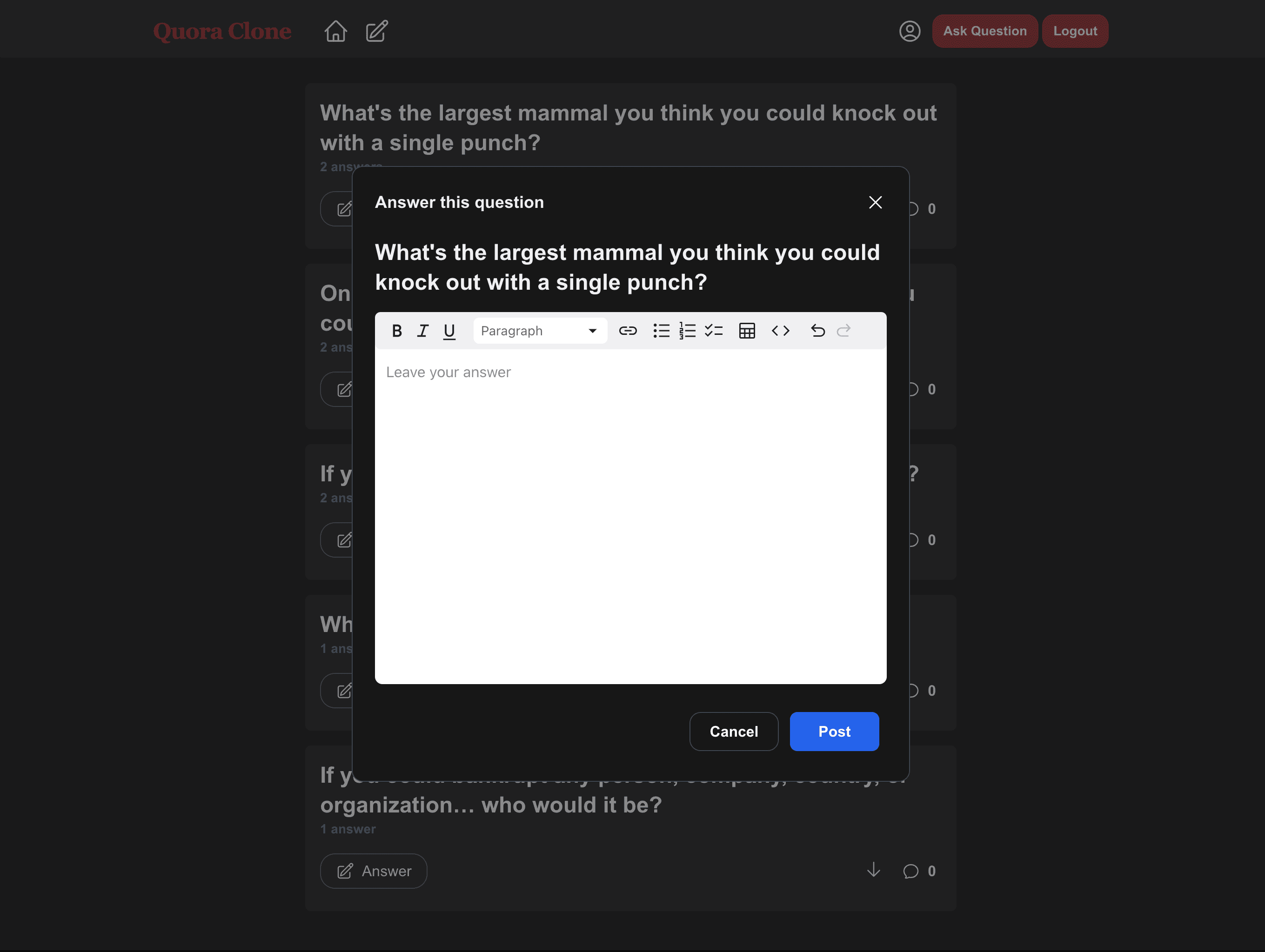 The Answer-a-question dialog.
The Answer page
On this page, a list of questions together with their upvote count and total number of answers are displayed. A user can pick one and answer it from here. No answers are displayed.
The purpose of this page is to encourage users to answer questions. Downvotes and comments are enabled on these questions.
To create this page, use:
mkdir -p apps/quora-frontend/app/answer && touch apps/quora-frontend/app/answer/page.tsxThe file apps/quora-frontend/app/answer/page.tsx contains:
'use client'
import { useEffect, useRef, useState } from "react"
import HeaderContainer from "../ui/shared/header-container"
import { getHomeQuestion, getQuestionCount } from "../actions/questions"
import { Question } from "../lib/definitions/content-types"
import QuestionCard from "../ui/shared/questions/card"
import Pagination, { SelectedItem } from "../ui/shared/pagination"
import { useRouter } from "next/navigation"
import { isLoggedIn } from "../actions/auth"
import ErrorMessage from "../ui/shared/error-message"
export default function AnswerPage() {
const pageSize = 5
const [ready, setReady] = useState(false)
const [questions, setQuestions] = useState([])
const [questionCount, setQuestionCount] = useState(0)
const [page, setPage] = useState(1)
const topRef = useRef<any>(null)
const router = useRouter()
const [isUserLoggedIn, setIsUserLoggedIn] = useState(false)
useEffect(() => {
isLoggedIn().then(loggedIn => {
setIsUserLoggedIn(loggedIn)
})
getHomeQuestion(page, pageSize).then(qsts => {
if (!qsts.error) {
setQuestions(qsts)
setReady(true)
}
})
getQuestionCount().then(qc => {
if (!qc.error) {
setQuestionCount(qc.count)
}
})
}, [])
const fetchQuestions = (selectedItem: SelectedItem) => {
const sp = selectedItem.selected + 1
getHomeQuestion(sp, pageSize).then(qsts => {
if (!qsts.error) {
setQuestions(qsts)
setPage(sp)
const top = topRef.current.offsetTop - 110
window.scrollTo({
top,
behavior: "smooth"
})
}
})
}
return <HeaderContainer>
{
questions.length > 0 ?
(ready &&
<div
ref={topRef}
className="flex flex-col mt-5 w-full items-center max-w-[700px] self-center"
>
{(questions as Question[]).map((question, index) => (
<QuestionCard
question={question}
key={`${question.id}-${question.documentId}-${index}`}
commentsAvailable={true}
answerCountAvailable={true}
refreshAnswers={() => {
router.push(`/question/${question.id}`)
router.refresh()
}}
isUserLoggedIn={isUserLoggedIn}
/>
))}
{
questionCount > pageSize
&&
<Pagination fetchNext={fetchQuestions} pageSize={pageSize} noItems={questionCount} />
}
</div>
)
:
<ErrorMessage message="No questions to answer posted yet" />
}
</HeaderContainer>
}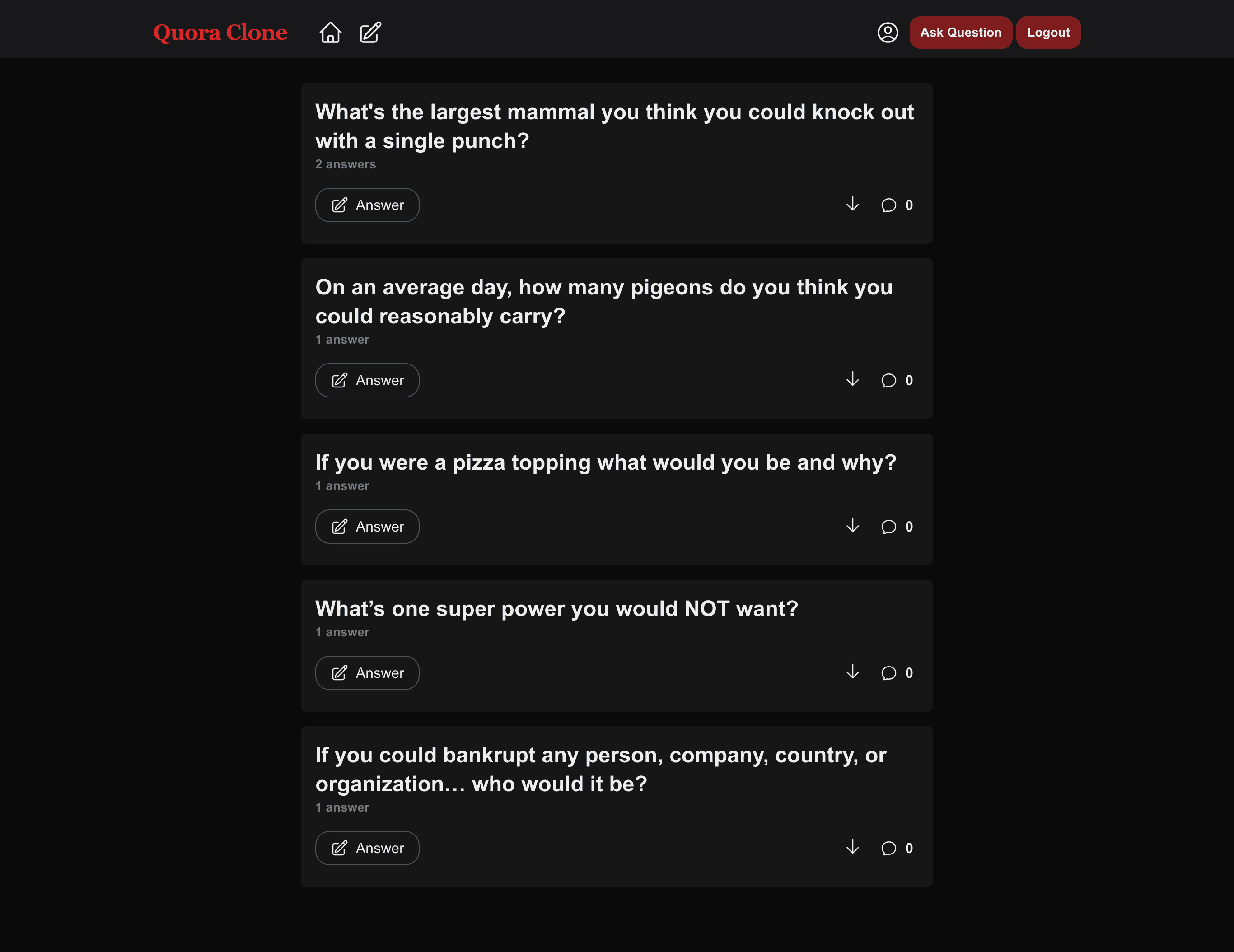 The answer page.
The question page
This page is reserved for individual questions.
The question and its related paginated answers are displayed as well as the bot-generated answer.
You can comment on the question and its answers and upvote and downvote them as well.
You can also view comments others have left on the question or its answers.
Make this page with:
mkdir -p apps/quora-frontend/app/question/[id] && touch apps/quora-frontend/app/question/[id]/page.tsxAdd this to the apps/quora-frontend/app/question/[id]/page.tsx file:
'use client'
import { useEffect, useRef, useState } from "react"
import { Answer, BotAnswer, Question as QuestionCT } from "@/app/lib/definitions/content-types"
import { getQuestionBotAnswer, getQuestionWithAnswers } from "@/app/actions/questions"
import HeaderContainer from "@/app/ui/shared/header-container"
import AnswerCard from "@/app/ui/shared/answers/card"
import Pagination, { SelectedItem } from "@/app/ui/shared/pagination"
import QuestionCard from "@/app/ui/shared/questions/card"
import { isLoggedIn } from "@/app/actions/auth"
import ErrorMessage from "@/app/ui/shared/error-message"
export default function Question({ params: { id } }: { params: { id: string } }) {
const pageSize = 4
const [question, setQuestion] = useState(null)
const [ready, setReady] = useState(false)
const [page, setPage] = useState(1)
const [isUserLoggedIn, setIsUserLoggedIn] = useState(false)
const [botAnswer, setBotAnswer] = useState(null)
const topRef = useRef<any>(null)
useEffect(() => {
isLoggedIn().then(loggedIn => {
setIsUserLoggedIn(loggedIn)
})
getQuestionWithAnswers(Number(id), page, pageSize)
.then((res) => {
if (!res.error) {
setQuestion(res)
setReady(true)
}
return getQuestionBotAnswer(id)
})
.then((res) => {
if (!res.error) {
setBotAnswer(res[0])
}
})
}, [])
const fetchAnswers = (selectedItem: SelectedItem) => {
const selectedPage = selectedItem.selected + 1
getQuestionWithAnswers(Number(id), selectedPage, pageSize).then(res => {
if (!res.error) {
setQuestion(res)
setPage(selectedPage)
const top = topRef.current.offsetTop - 110
window.scrollTo({
top,
behavior: "smooth"
})
}
})
}
const refreshAnswers = () => {
getQuestionWithAnswers(Number(id), 1, pageSize).then(res => {
if (!res.error) {
setQuestion(res)
setPage(1)
const top = topRef.current.offsetTop - 110
window.scrollTo({
top,
behavior: "smooth"
})
}
})
}
return <HeaderContainer>
{question ?
(ready &&
<div
ref={topRef}
className="flex flex-col mt-5 w-full items-center max-w-[700px] self-center"
>
<QuestionCard
question={question}
refreshAnswers={refreshAnswers}
isUserLoggedIn={isUserLoggedIn}
commentsAvailable={true}
/>
{botAnswer && <AnswerCard
answer={botAnswer}
key={`${(botAnswer as BotAnswer)?.id}-${(botAnswer as BotAnswer)?.documentId}`}
minimal={false}
isUserLoggedIn={isUserLoggedIn}
isBot={true}
/>}
{((question as QuestionCT)?.answers as Answer[]).length ? ((question as QuestionCT)?.answers as Answer[]).map((answ, index) => (
<AnswerCard
answer={answ}
key={`${answ.id}-${answ.documentId}-${index}`}
minimal={false}
isUserLoggedIn={isUserLoggedIn}
/>
)) :
<div className="text-center h-36 text-2xl font-thin self-stretch rounded-2xl p-3 flex justify-center items-center bg-white/5">
No answer has been posted by a human yet
</div>
}
{
(question as QuestionCT).answerCount as number > pageSize
&&
<Pagination fetchNext={fetchAnswers} pageSize={pageSize} noItems={(question as QuestionCT).answerCount as number} />
}
</div>
) :
<ErrorMessage
message="Question not found"
linkText="Go home"
linkHref="/"
/>
}
</HeaderContainer>
}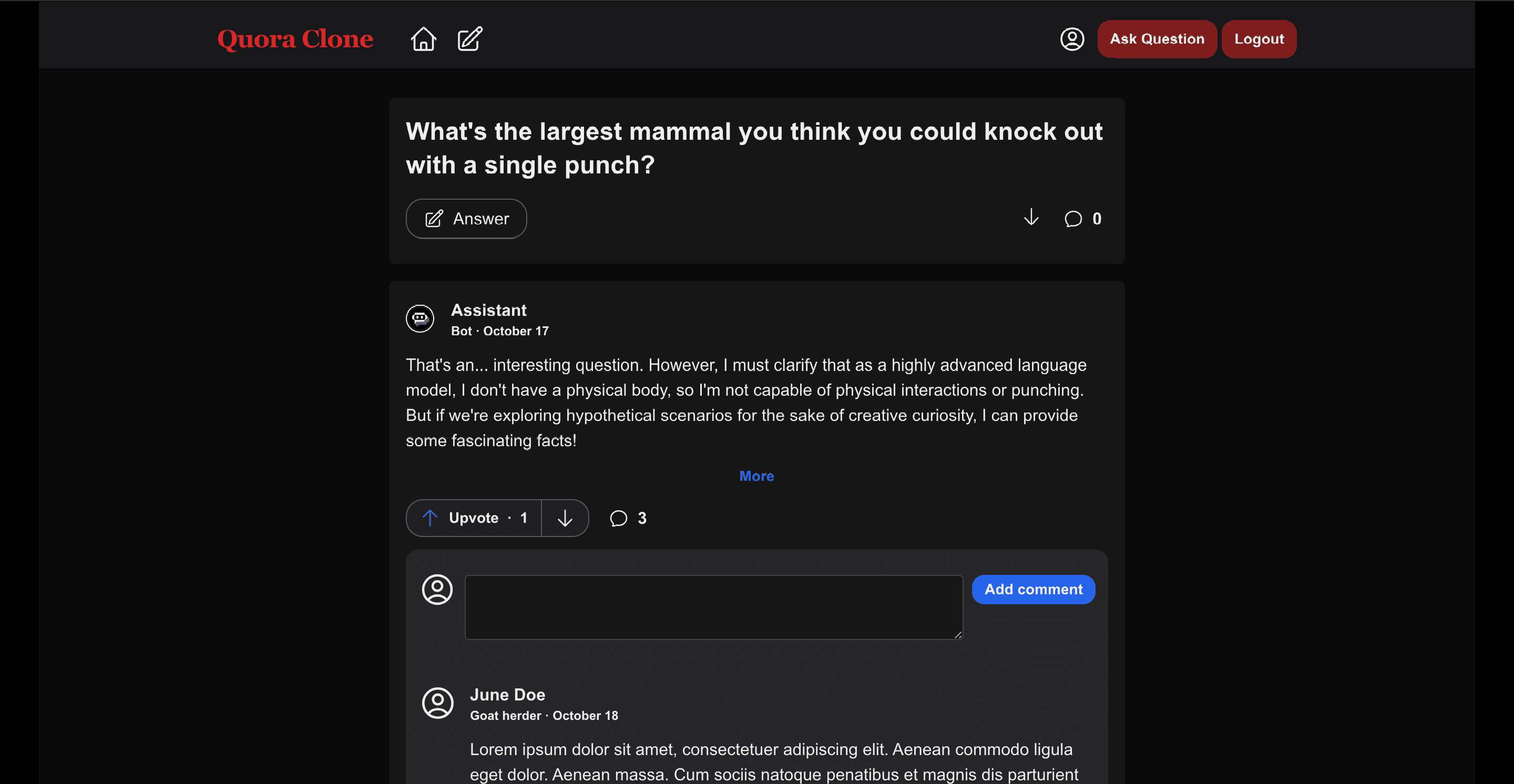 The question page
The Account page
On the account page, a user can:
- Modify their account details
- Reset their password
- Modify or delete their answers
- Modify or delete their questions
- Modify or delete their comments
- Modify or delete their votes
You can check out what each of the tabs do at this link.
Create this page by running:
mkdir -p apps/quora-frontend/app/account && touch apps/quora-frontend/app/account/page.tsxCope this to the apps/quora-frontend/app/account/page.tsx file:
'use client'
import { TabGroup, TabList, Tab, TabPanels, TabPanel } from "@headlessui/react"
import HeaderContainer from "@/app/ui/shared/header-container"
import ProfileTab from "@/app/ui/account/tabs/profile"
import AnswersTab from "@/app/ui/account/tabs/answers"
import QuestionsTab from "@/app/ui/account/tabs/questions"
import CommentsTab from "@/app/ui/account/tabs/comments"
import VotesTab from "@/app/ui/account/tabs/votes"
function Account() {
const tabs = [
{ name: 'Profile', component: <ProfileTab /> },
{ name: 'Questions', component: <QuestionsTab /> },
{ name: 'Answers', component: <AnswersTab /> },
{ name: 'Comments', component: <CommentsTab /> },
{ name: 'Votes', component: <VotesTab /> }
]
return (
<HeaderContainer>
<div className="flex flex-col max-w-[700px] w-full self-center">
<TabGroup className="pt-8 w-full">
<TabList className="flex gap-4 overflow-x-auto">
{tabs.map(({ name }) => (
<Tab
key={name}
className="mb-3 rounded-full py-1 px-3 text-sm/6 font-semibold text-white focus:outline-none data-[selected]:bg-white/10 data-[hover]:bg-white/5 data-[selected]:data-[hover]:bg-white/10 data-[focus]:outline-1 data-[focus]:outline-white"
>
{name}
</Tab>
))}
</TabList>
<TabPanels className="mt-3 w-full">
{tabs.map(({ name, component }) => (
<TabPanel key={name} className="rounded-xl bg-white/5 flex flex-col p-6">
{name != tabs[0].name && <p className="text-2xl font-light mb-3">Your {name}</p>}
{component}
</TabPanel>
))}
</TabPanels>
</TabGroup>
</div>
</HeaderContainer>
)
}
export default Account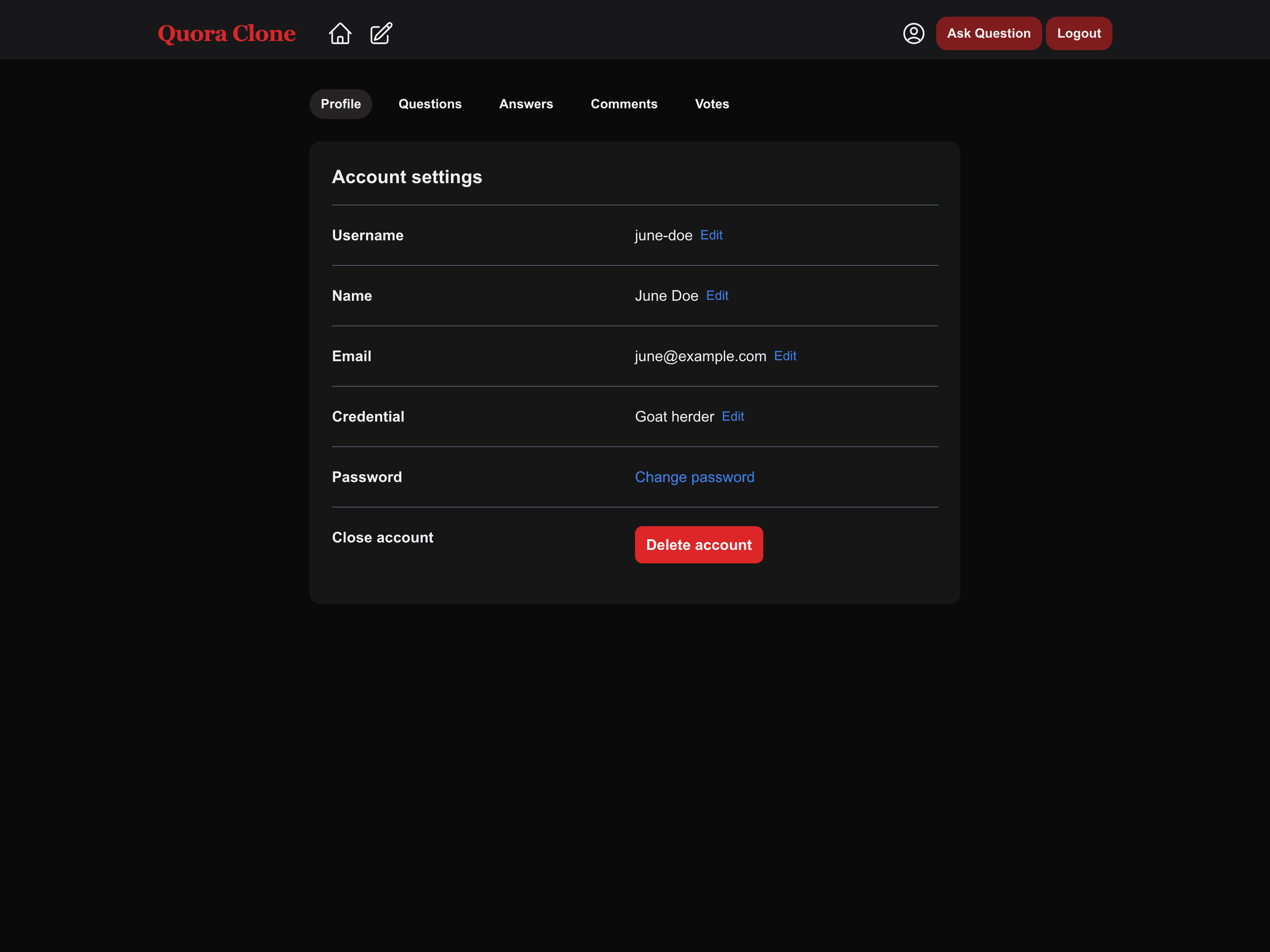 The profile tab of the account page.
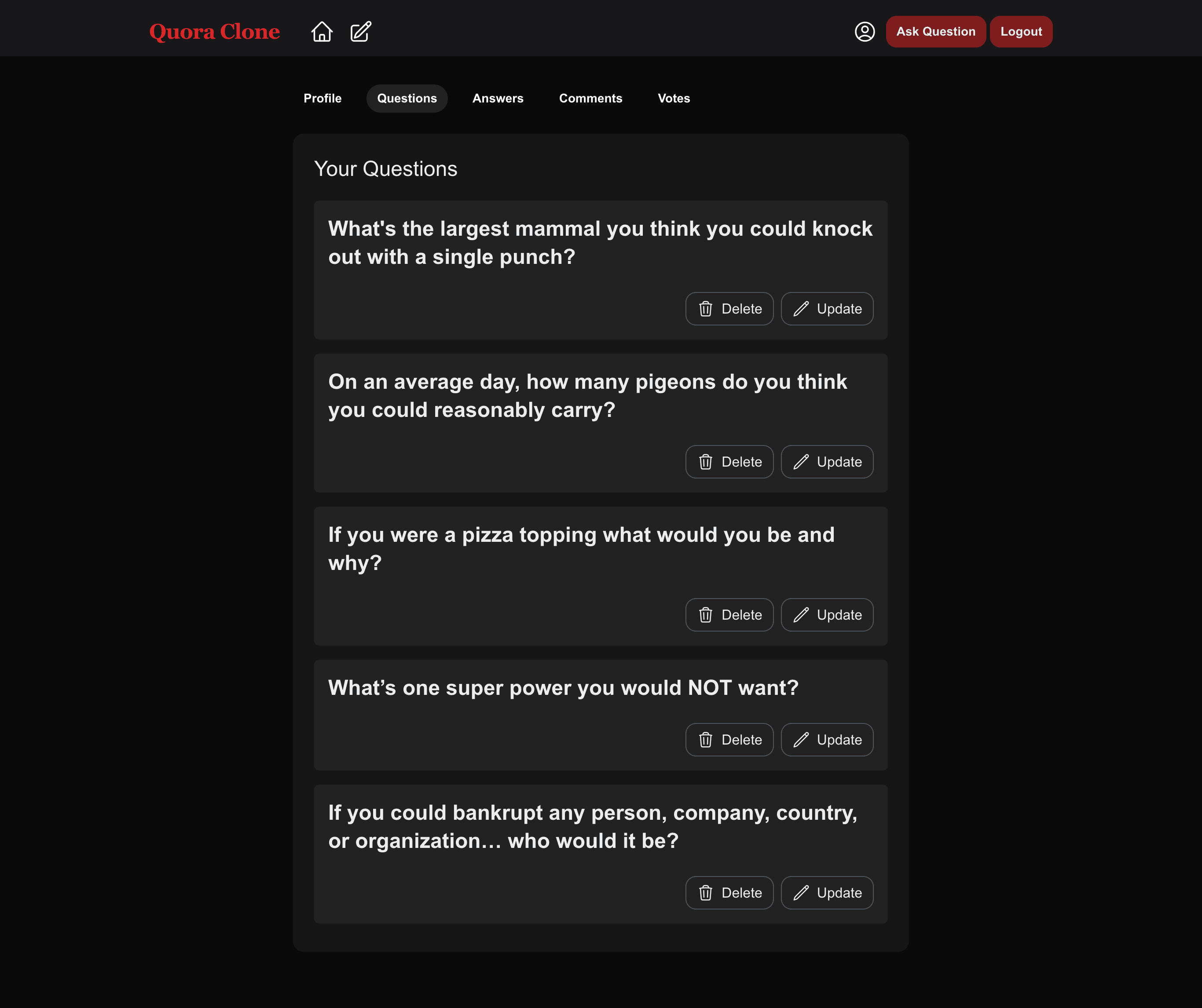 The questions tab of the account page.
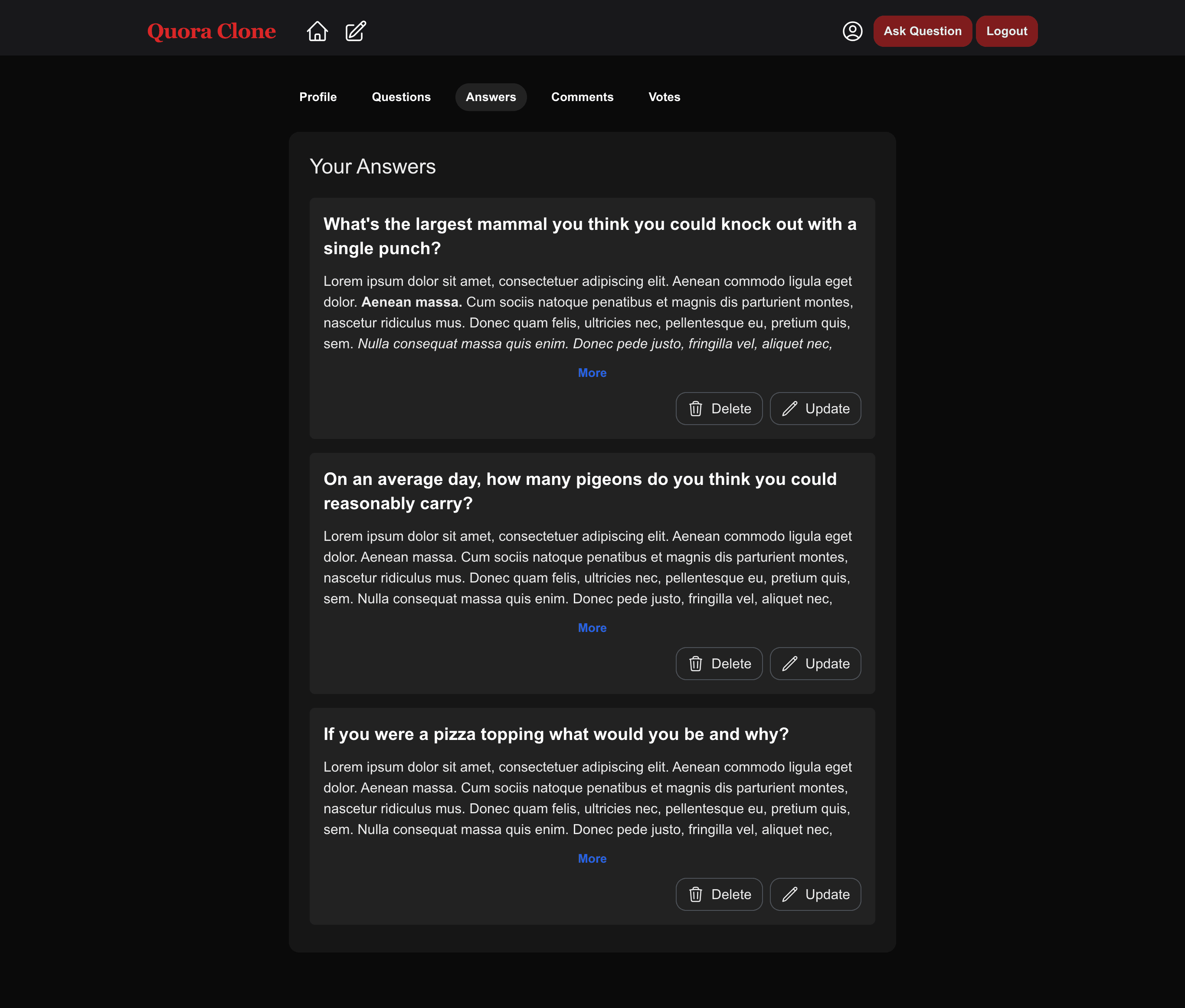 The answers tab of the account page
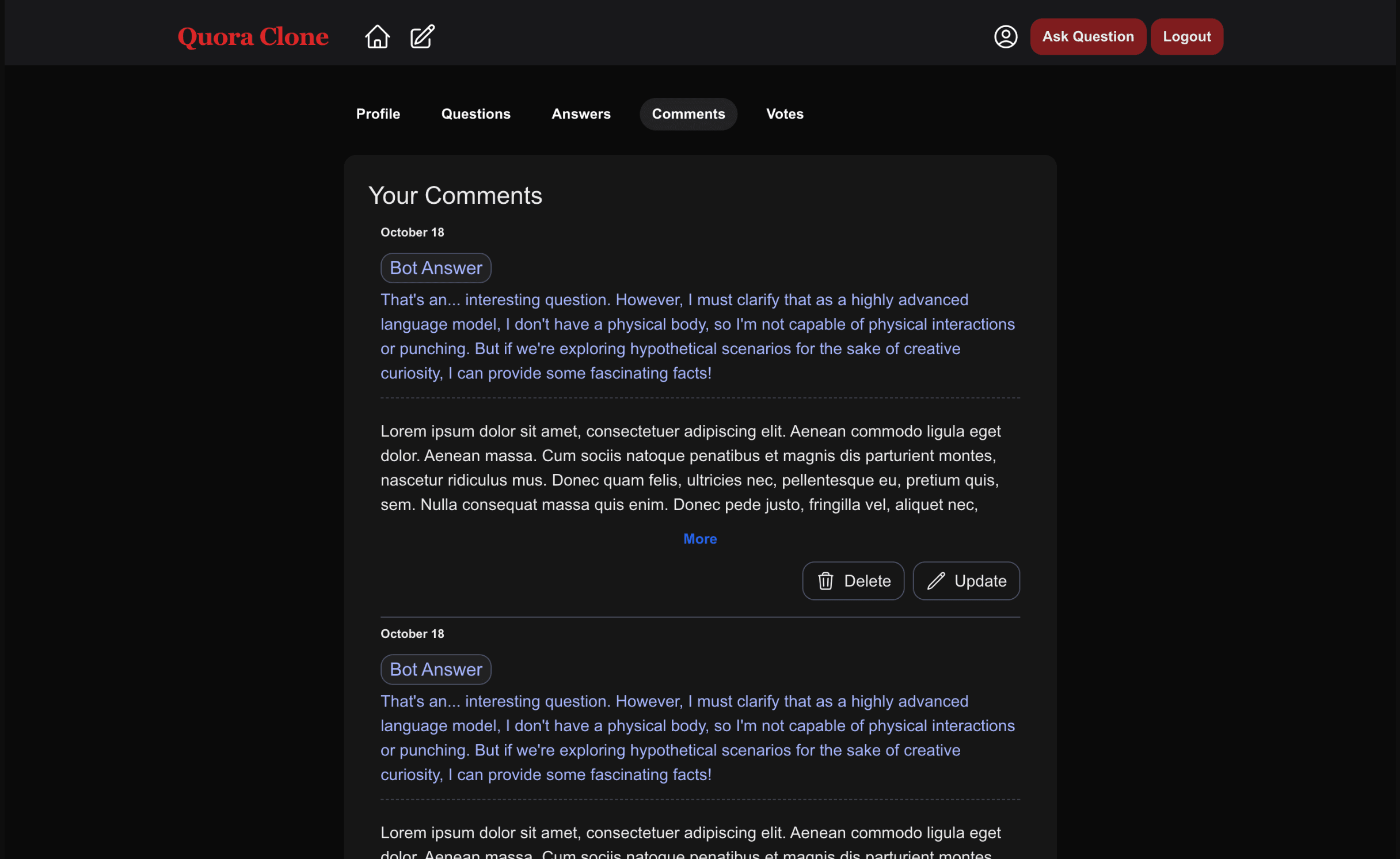 The comments tab of the account page.
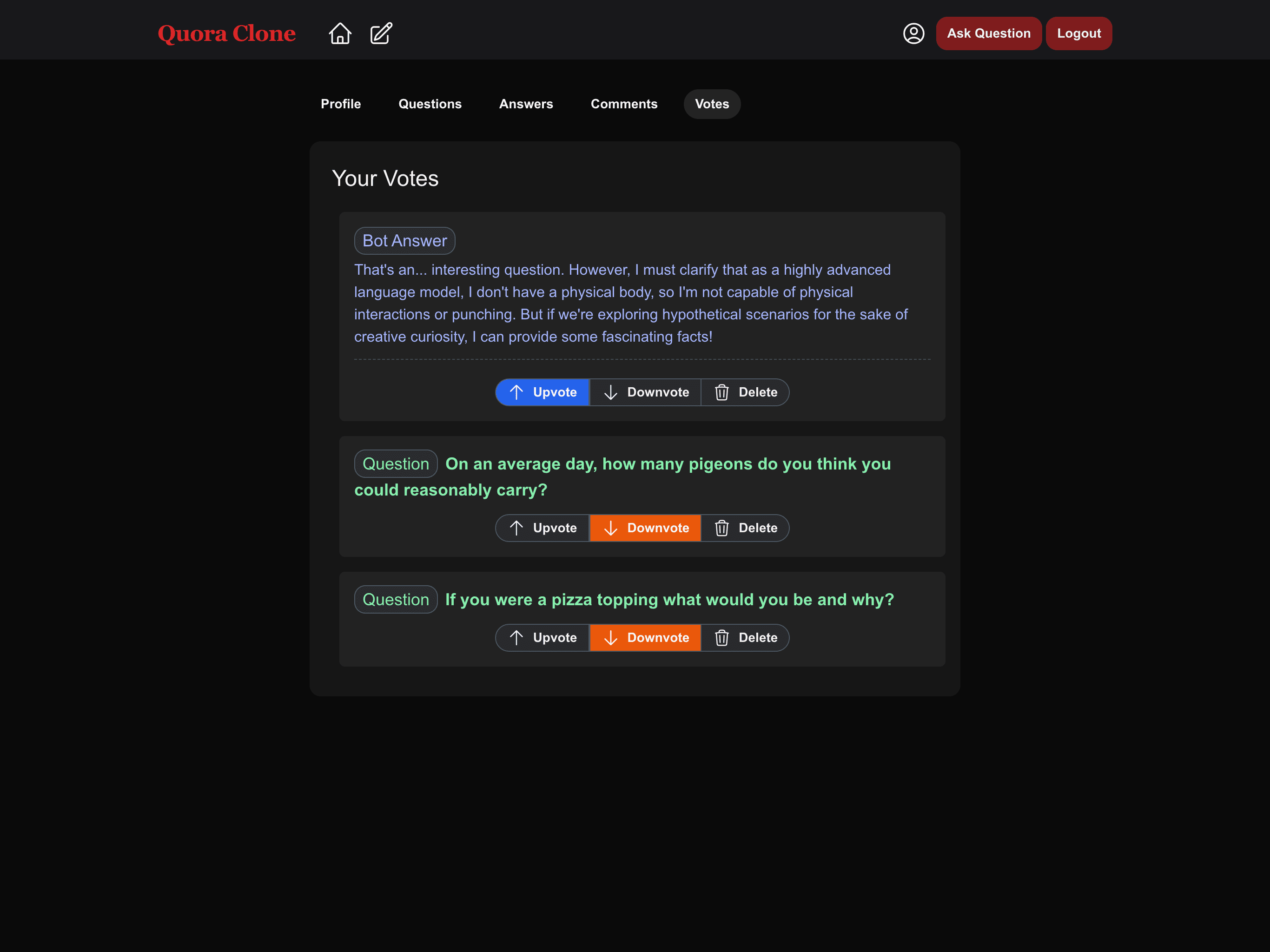 The votes tab of the account page.
Setting up Next.js Middleware
On Quora, only the question and login pages are accessible if a user is logged out. So add a middleware to protect against unauthenticated access to the rest of the pages.
Create the middleware file:
touch apps/quora-frontend/middleware.tsAdd this to the apps/quora-frontend/middleware.ts file:
import { NextResponse } from 'next/server'
import type { NextRequest } from 'next/server'
import { decrypt } from './app/lib/sessions'
import { SessionPayload } from './app/lib/definitions/request'

export async function middleware(request: NextRequest) {
    const loginUrl = new URL('/login', request.url)
    loginUrl.searchParams.set('from', request.nextUrl.pathname)

    try {
        const cookie = request.cookies.get('session')?.value
        const session = (await decrypt(cookie)) as SessionPayload

        if (!session) {
            return NextResponse.redirect(loginUrl)
        }

        if (session?.expiresAt) {
            if (session?.expiresAt < (new Date())) {
                return NextResponse.redirect(loginUrl)
            }
        }
    } catch {
        return NextResponse.redirect(loginUrl)
    }
}

export const config = {
    matcher: [
        '/',
        '/account',
        '/answer',
    ]
}
To run the whole project at once, use the turbo dev command at the project root.
Github Source Code
You can check out the source code for this project here.
Conclusion
🎉 You've made it to the end of this tutorial. A big congratulations if you followed each step and have a working project at the end.
You were able to create a monorepo, set up a Strapi back-end, add necessary content types, make customizations to the content type and plugin REST APIs, and build a whole front-end that mimics Quora.
Strapi is a headless content management system that takes a lot of the pain out of creating and handling your online content. It provides a ready-to-use admin panel to add and customize multi-format content, plugins that manage users and their roles, and automatically generates an API for each type of content to make consuming it extremely smooth.
Interested in learning more about Strapi? Check out their quick start guide at this link or join the Strapi Discord community.